










Webflow CS and Make API workflows allow you to automate job board listings. This post explains the full process.
Job boards require constant content updates and data synchronization. Webflow's CMS API combined with Make.com's visual automation platform eliminates manual posting workflows through webhook-driven architectures and bulk API operations.
This guide explains the integration architecture, authentication patterns, and workflow automation concepts needed to build production job board automations without custom backend infrastructure.
Integration architecture: External sources → Make.com → Webflow CMS
The integration follows a three-layer pattern: external job sources push data through Make.com's transformation layer, which routes it to Webflow's CMS API. Webflow's staged-to-live content workflow ensures validation before publication, while Make.com handles data transformation and error recovery.
System relationships
External job sources (ATS platforms, job aggregators, custom databases) send data to Make.com via HTTP webhooks or scheduled polling. Make.com transforms this data to match your Webflow CMS schema, then writes it through Webflow's CMS API. Webflow stages the content for review before publishing to your live site.
At a high level, you'll:
- Configure Webflow CMS collections with field types that match your job data structure
- Set up Make.com scenarios to handle data transformation between external sources and Webflow
- Connect webhook triggers for real-time job posting synchronization
Data flow patterns
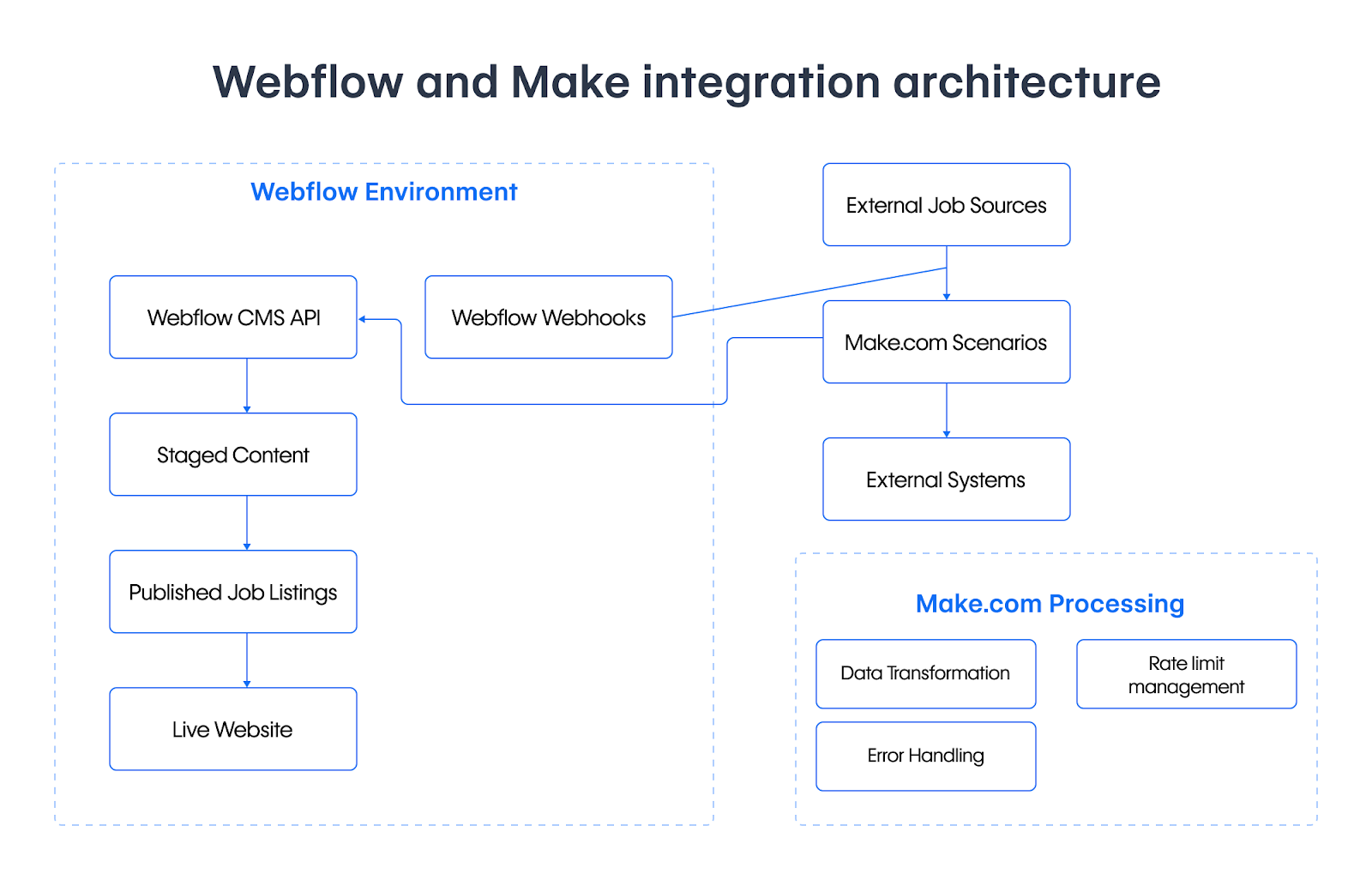
This architecture supports both push-based updates (external sources triggering Make.com) and pull-based synchronization (scheduled Make.com polling). Bidirectional webhooks enable Webflow to notify external systems when job postings change.
Authentication: Site Tokens vs OAuth 2.0
Clarified technical distinctions and refined content actionability.
This section needs to be more concise and clearer about the trade-offs. The research clarifies that Site Tokens do have scope selection, and HMAC verification is specifically for OAuth apps.
Choose between Site Tokens for quick implementation or OAuth 2.0 for production environments with granular permissions.
Site Tokens: Simplest authentication
Generate Site Tokens through Project Settings → Integrations → API Access. You'll select scopes during generation (cms:read, cms:write), though tokens provide full access within those selected scopes—unlike OAuth, which supports more granular permission control.
Tokens remain valid for 365 days of inactivity before expiring. Each token displays only once at generation, so store it securely. You can maintain up to 5 tokens per site for rotation purposes.
OAuth 2.0: Production-grade access control
OAuth 2.0 authorization enables scoped permissions (sites:read, cms:read, cms:write, collections:read, collections:write) with automatic token refresh managed by Make.com. This approach supports multi-site integrations and user-specific access controls.
OAuth apps also support Webflow's native HMAC webhook signatures for payload verification—Site Token integrations require implementing custom verification (e.g., shared secrets in headers or URL tokens).
Connect Make.com to Webflow
Create a Make.com connection using either authentication method. OAuth connections handle token refresh automatically, while Site Token connections persist indefinitely with regular use (the 365-day expiration only triggers after inactivity). Consider periodic rotation as a security practice regardless.
Production implementations should use OAuth 2.0 with minimum necessary scopes, implement HMAC webhook verification, and monitor API usage per key.
Rate limits: Plan your API architecture
Webflow enforces 60 requests/minute (Starter/Basic plans) or 120 requests/minute (CMS/Business plans), with a global 600 requests/minute cap across all endpoints. The Publish Site endpoint (POST /sites/{site_id}/publish) is limited to 1 request/minute—individual CMS item publishing via /items/{id}/publish follows the general rate limits.
Make.com's webhooks handle 30 requests/second with built-in retry logic and exponential backoff for 429/500 errors.
Design for rate limits
Use bulk endpoints like /items/bulk to process up to 100 items per request—critical for initial migrations and large-scale synchronization. Webhook-based architectures are more efficient than polling patterns when considering rate limits.
At a high level, you'll:
- Configure webhook triggers instead of scheduled polling for real-time updates
- Implement bulk operations using Make.com's Aggregator modules
- Monitor
X-RateLimit-Remainingheaders and implement exponential backoff for HTTP 429 responses
HTTP 429 responses include Retry-After headers for proper backoff timing. Make.com includes automatic retry mechanisms, but your scenario design should account for rate limit recovery windows.


















Design normalized CMS collections for job data
Webflow's CMS supports 17 field types with relational capabilities through Reference and Multi-Reference fields. Normalized data models eliminate duplication and maintain consistency across your job board.
Structure collections for relational data
Create separate collections for Jobs, Employers, Locations, and Categories, then connect them through Reference fields. This pattern provides a single source of truth for shared data like employer information.
At a high level, you'll:
- Create your primary Jobs collection with core posting fields (title, description, posted date, application link)
- Design supporting collections for related entities (Employers, Locations, Categories)
- Connect collections using Reference fields (one-to-one) or Multi-Reference fields (one-to-many)
Map field types to job data
Plain Text handles titles and company names. Rich Text manages formatted job descriptions with HTML. Date/Time fields track posting dates and application deadlines. Number fields store salary ranges. Option fields define employment types (Full-time, Contract, Remote).
Reference fields link to your Employers collection—update employer information once, and it propagates across all related job listings automatically.
Configure Make.com scenarios for data transformation
Make.com's Webflow modules provide comprehensive CMS operations through webhook triggers and action modules, with dynamic field mapping that adapts to your collection schema.
Set up webhook triggers
Configure webhook modules to monitor Webflow events (item.create, item.update, form.submission) or receive data from external job sources. Make.com generates webhook URLs automatically and registers them with Webflow.
Transform external data to match Webflow schemas
Make.com's visual interface maps external job data to Webflow's field requirements. Iterator modules process arrays individually, Router modules implement conditional logic, and Aggregator modules batch operations for bulk API efficiency.
At a high level, you'll:
- Configure HTTP modules to receive external job data
- Map data transformations between external formats and Webflow field types
- Implement bulk processing using Aggregator modules for large job datasets
The transformation layer handles date formatting (ISO 8601 conversion), reference field lookup (matching employer names to Employer collection IDs), rich text conversion with HTML sanitization, and image uploads to Webflow's Assets API before field assignment.
Data integrity and schema changes
Failure handling: Webflow's CMS API lacks transactional guarantees. If creating a job with employer and location references fails mid-process, you'll have orphaned records. Use external job IDs as idempotency keys in Make.com's data stores to detect and skip already-processed items. Mark failed items with custom boolean fields rather than deleting immediately, as this provides recovery windows.
Schema evolution: Adding fields is safe and doesn't break existing integrations. For breaking changes (removing fields, altering Reference targets), deploy new schema alongside old, migrate data via bulk operations, verify, then remove old structure. Field type changes require creating new fields since Webflow doesn't support in-place modifications. Use Webflow's staging environments to validate migrations before production deployment.
Process webhooks with conditional routing
Webflow's webhook system sends HMAC-signed HTTP POST requests when webhooks are created via OAuth apps. Webhooks created through the dashboard or using Site Tokens don't include signature headers; if using Make.com as an intermediary, rely on Make's built-in verification or implement custom validation on your endpoint.
Configure Webflow webhooks
Set up webhooks through Webflow's API or dashboard to monitor specific events. Each webhook includes event type specification (item.create, item.update, item.delete), target URL pointing to your Make.com scenario, and HMAC signature verification for OAuth-based webhooks.
Webhook payloads contain triggerType, affected resource IDs, and timestamps for idempotent processing.
Handle webhook events in Make.com
Make.com's webhook modules provide instant HTTP endpoints with configurable queue processing. Router modules direct events to appropriate handling logic based on event type—creates trigger new job postings, updates modify existing listings, and deletes remove jobs from your site.
Error handling modules capture failed webhook processing, implement retry logic with exponential backoff, and route issues to monitoring systems.
Deploy with environment management
Webflow provides environment separation with GitHub integration and automated deployments. Make.com requires manual versioning practices due to platform limitations in native environment separation.
Webflow's multi-environment workflow
Webflow Cloud supports development, staging, and production environments with branch-based deployments and zero-downtime releases. Connect GitHub repositories to your Webflow project for automated deployments on code changes, with rollback capabilities through Git commit reversion.
Make.com's versioning limitations
Make.com lacks native environment separation and Git-like scenario versioning. Production implementations require duplicate scenarios labeled for staging and production, or conditional logic within scenarios to differentiate behavior based on environment variables.
At a high level, you'll:
- Connect GitHub to Webflow Cloud for automated environment management
- Maintain Make.com scenario blueprints through manual export for version control
- Test end-to-end workflows in staging before production deployment
This architectural mismatch between Webflow's robust multi-environment system and Make.com's manual versioning approach requires external discipline for environment parity and deployment coordination in production implementations.
Monitor integration health
Production monitoring requires visibility into API usage, webhook processing, error rates, and data synchronization status. Webflow's execution logs combined with Make.com's scenario history provide operational insights.
Track these metrics:
- API quota consumption (60-120 requests/minute depending on plan tier)
- Webhook processing rates and failure patterns
- Data consistency between external sources and Webflow collections
- Token expiration schedules for rotation planning
Regular maintenance includes rotating API keys before expiration, monitoring webhook failures and retry patterns, and validating that job data synchronizes correctly across all systems.



















