










Maintain your knowledge base in Notion and have it update automatically in Webflow CMS.
Content teams want Notion's collaborative editing. Developers need reliable CMS infrastructure that scales. This integration delivers both; enabling teams to author in Notion while publishing production-grade websites through Webflow's semantic HTML output.
The core challenge: Notion's nested content structure and metadata-only webhooks don't map cleanly to Webflow's flat field system. Add strict rate limits on both sides—3 requests per second for Notion and 60-120 requests per minute for Webflow—and real-time sync becomes architecturally complex.
Architecture overview
The integration requires a hybrid webhook-polling architecture handling fundamental platform differences. Notion's webhooks deliver metadata only—page IDs and timestamps, not content. Every webhook event requires a follow-up API call to fetch actual changes.
This diagram shows the data flow and constraint points:
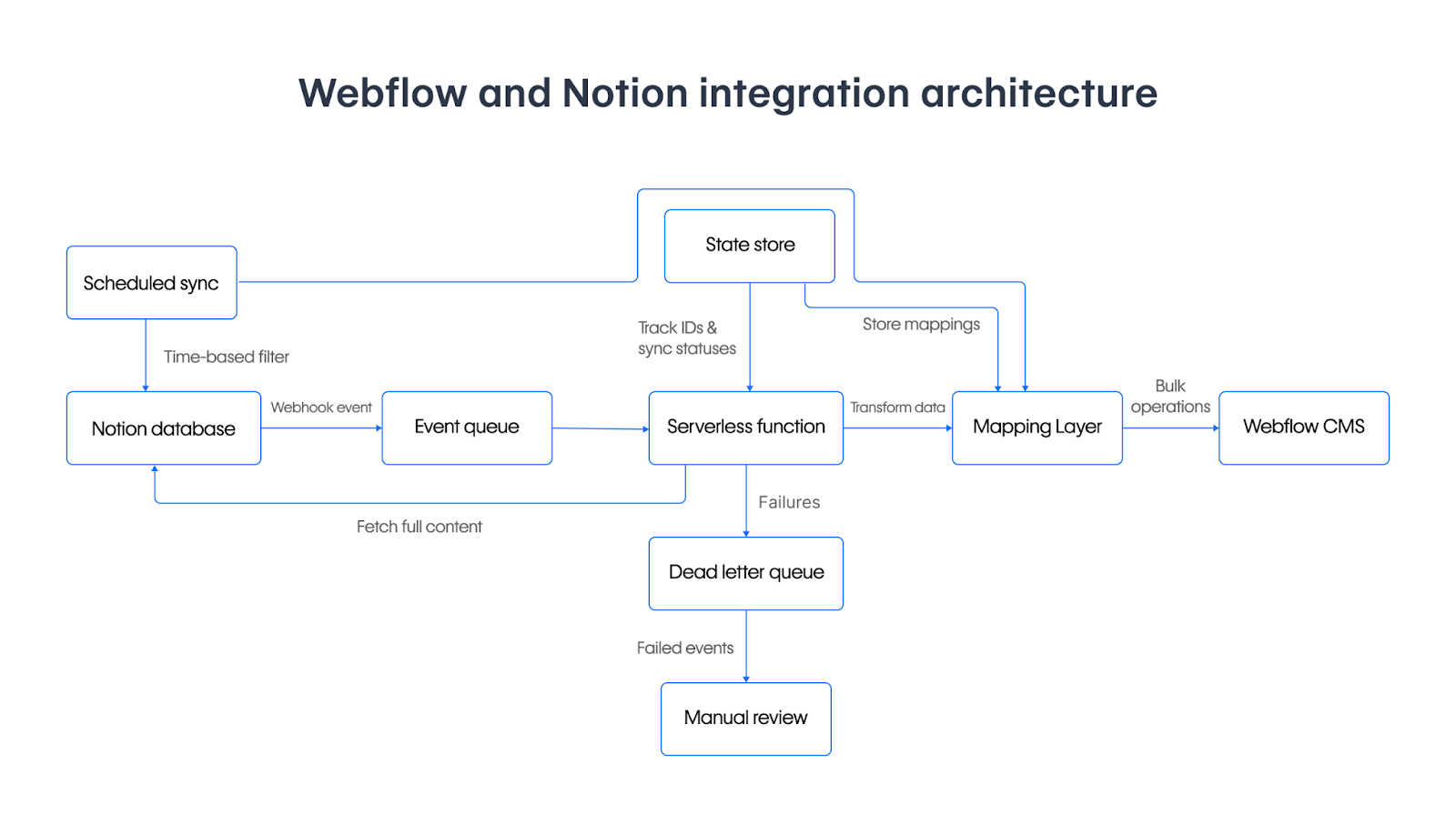
Rate limiting makes real-time sync impossible for large datasets. Notion's 3 requests per second limit combined with Webflow's 60-120 requests per minute limit means a 100-item database requires minimum 30+ seconds to process. Webflow's publish endpoint allows just 1 request per minute, creating additional bottlenecks.
Content transformation complexity compounds the challenge. Notion's nested JSON blocks must convert to Webflow's HTML format while preserving rich text formatting, maintaining bidirectional relations, and handling schema differences between platforms.
Implementation concepts
Building this sync requires four implementation phases addressing platform constraints and data transformation.
At a high level, you'll:
- Configure OAuth 2.0 authentication for Notion
- Set up webhook endpoints with HMAC validation for event processing
- Design data transformation layers converting Notion's nested blocks to Webflow's HTML
- Implement rate-limited operations with queue management
Authentication setup
Configure OAuth 2.0 flows handling Webflow's 365-day token expiration (reset on each API call) and Notion's non-expiring access tokens (valid indefinitely unless manually revoked). Implement error handling for revoked tokens (401 responses) rather than proactive refresh logic.
Webhook infrastructure
Process Notion's metadata-only webhook events with HMAC-SHA256 signature validation. Implement message queues for rate-limited processing since webhooks deliver faster than downstream APIs can handle.
Data transformation
Convert Notion's nested JSON blocks to Webflow's HTML format. Map Notion property types (select, multi-select, relation, rollup) to equivalent Webflow field types while handling cardinality differences.
To illustrate the transformation challenge, here's how the same content appears in each platform.
A simple Notion page with a heading and paragraph returns this block structure:
{
  "object": "list",
  "results": [
    {
      "object": "block",
      "type": "heading_2",
      "heading_2": {
        "rich_text": [
          {
            "type": "text",
            "text": { "content": "Getting Started" },
            "annotations": { "bold": false, "italic": false, "code": false }
          }
        ]
      }
    },
    {
      "object": "block",
      "type": "paragraph",
      "paragraph": {
        "rich_text": [
          {
            "type": "text",
            "text": { "content": "Welcome to the " }
          },
          {
            "type": "text",
            "text": { "content": "knowledge base" },
            "annotations": { "bold": true }
          },
          {
            "type": "text",
            "text": { "content": ". This guide covers setup and configuration." }
          }
        ]
      }
    }
  ]
}
Webflow's CMS expects this same content as a flat HTML string in your Rich Text field:
{
  "fieldData": {
    "name": "Getting Started Guide",
    "slug": "getting-started-guide",
    "body": "<h2>Getting Started</h2><p>Welcome to the <strong>knowledge base</strong>. This guide covers setup and configuration.</p>"
  }
}
The transformation logic walks Notion's block array, reconstructs formatting from the annotations object, and emits valid HTML. Nested structures like toggle lists, callouts, and tables add complexity since Notion represents them as parent blocks with has_children: true, requiring recursive fetches to retrieve child blocks before producing complete HTML output.
Sync orchestration
Combine webhook-triggered updates with scheduled polling for comprehensive consistency. Webhooks handle real-time content changes while periodic full syncs catch missed events and resolve drift.


















Configuration patterns
Production configurations require careful rate limit management, field mapping logic, and error handling.
Rate limit management
Implement token bucket algorithms respecting Notion's 3 requests/second and Webflow's plan-based limits. Use queue systems with exponential backoff for 429 responses.
Field mapping configuration
Direct mappings work for primitive types (text, number, date). Rich text requires custom transformation from Notion's block structure to HTML. Handle Notion's bidirectional relations by storing mappings in external state since Webflow references are unidirectional.
Failure modes and recovery:
Key architectural questions determine your implementation approach:
- Notion downtime: Webhooks queue in Notion's system for 3 days before dropping. Implement periodic polling as fallback to catch missed events.
- Webflow rate limits mid-batch: Bulk operations fail entirely. You can design for partial success by processing smaller batches with resumption logic.
- Queue overflow: Configure dead letter queues for events exceeding retry limits. Monitor queue depth and alert before capacity.
- Transformation failures: Implement skip-and-log patterns to prevent one invalid page from blocking the entire queue. Store failed transformations for manual review.
Differentiate transient failures (rate limits, network errors) from permanent failures (authentication, validation errors) using Notion's status codes and Webflow's error responses. Implement retry logic with exponential backoff for transient errors.
State management
Store sync checkpoints, ID mappings, and failure states in a persistent database supporting atomic updates. Track:
- Bidirectional mappings between Notion page IDs and Webflow item IDs
- Select/multi-select option synchronization across platforms
- Sync timestamps for incremental update windows
Property-to-field mappings are typically static configuration rather than runtime state. Unless you're building a visual mapping interface for non-technical users, hardcode these mappings in your sync logic where they're version-controlled and easier to reason about during debugging.
Notion lacks Webflow's staged/live workflow concept, requiring external tracking of content states.
Verification approach
Confirm integration success through systematic testing of sync operations and data integrity.
Sync operation testing
Test content transformation accuracy by comparing source Notion content with transformed Webflow output. Use Webflow's staged content endpoints to inspect synchronized data before publishing. Verify webhook delivery with proper field type handling.
Integration health monitoring
Monitor webhook delivery success rates, API response times, and rate limit consumption. Implement alerting for authentication failures, quota exhaustion, and sync delays using dead letter queues for events requiring manual intervention.
Data integrity validation
Run periodic reconciliation comparing Notion database states with Webflow collection contents. Test schema evolution scenarios to verify graceful handling without data corruption.
Advanced considerations
Production integrations require approaches to scaling, performance optimization, and operational reliability.
Multi-database architecture
Large knowledge bases often span multiple Notion databases requiring selective sync to different Webflow collections. Flatten Notion's parent-child relationships into Webflow's collection model using Reference fields.
Performance optimization
Cache frequently accessed content and pre-compute expensive transformations during off-peak hours. Batch related API operations to minimize round trips—Webflow supports up to 100 items per bulk request.
Operational excellence
Implement comprehensive logging and design rollback procedures for corrupted syncs. Maintain content backups supporting point-in-time recovery. Document operational runbooks for common failure scenarios.
Scaling patterns
Consider event-driven architectures using message queues and serverless functions for automatic scaling. Apply infrastructure-as-code for reproducible deployments and continuous integration practices testing integration reliability.
This architectural foundation enables reliable Notion-to-Webflow synchronization while handling cross-platform data integration complexity. Focus on incremental implementation, thorough testing, and operational monitoring to build robust knowledge base platforms.



















