










Connect Stripe payment processing to Webflow sites for digital product sales using serverless functions, webhook handlers, or Payment Links.
Selling digital products through Webflow requires understanding how payment processing, content delivery, and product management systems connect. This guide explains the architectural patterns for integrating Stripe with Webflow, helping you choose the right approach based on your technical requirements and infrastructure constraints.
What this integration enables
Stripe handles payment collection and processing while Webflow manages your product catalog and site content. The integration point between these systems determines your implementation complexity and fulfillment capabilities.
At a high level, you'll need to understand:
- Which Stripe payment method matches your infrastructure (Payment Links for serverless vs Checkout Sessions for server-required)
- How webhook-driven fulfillment with checkout.session.completed events delivers digital products after purchase
- What data transformations are required to sync products between platforms (price conversion, image object formatting, timestamp conversion)
- Where serverless functions fit when Webflow needs backend webhook handlers for Stripe events
The critical architectural decision is whether you can use Payment Links (no backend required) or need Checkout Sessions (server-side infrastructure mandatory). This choice affects everything downstream.
Integration architecture overview
Digital product marketplaces built with Stripe and Webflow follow one of three distinct architectural patterns, ranging from fully serverless to full backend infrastructure.
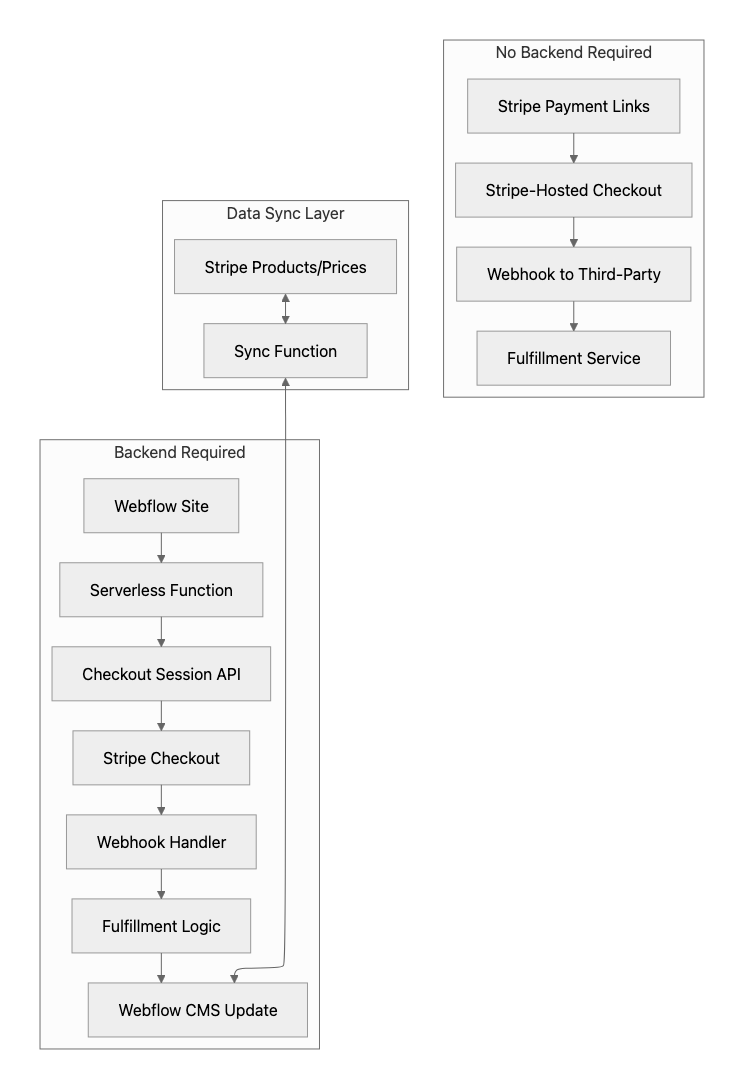
Payment Links create shareable URLs that redirect customers to Stripe-hosted checkout pages:
- No server infrastructure required
- Limited to 20 line items maximum
- Cannot pass custom session-specific parameters without API integration
- See Payment Links documentation for configuration options
Checkout Sessions require server-side session creation and webhook handling:
- Full control over checkout experience
- Up to 100 line items in payment mode (20 in subscription mode)
- Custom fulfillment workflows
- See Checkout Sessions API for implementation details
Webhook handlers are essential for reliable digital product delivery. Client-side confirmation callbacks are insufficient because browser closures, network failures, and asynchronous payment methods can prevent fulfillment. Payment Links still require webhook handlers (or a third-party fulfillment service) to deliver digital products.
Step 1: Set up accounts and credentials
Before implementing Stripe payments in Webflow, configure accounts and gather credentials from both platforms.
Set up your Stripe account
Create or access your Stripe Dashboard and locate your API keys under Developers > API keys.
You'll need:
- Publishable key (pk_test_... or pk_live_...) for client-side operations
- Secret key (sk_test_... or sk_live_...) for server-side operations only
- Webhook signing secret (whsec_...) for verifying webhook payloads
See Stripe's API keys documentation for the security model. Secret keys grant complete account access and must never appear in client-side code, public repositories, or browser-accessible locations.
Configure Webflow API access
Generate API credentials through your Webflow Dashboard site settings or workspace settings.
You'll need:
- Site token for single-site CMS operations
- OAuth token for multi-site access through OAuth 2.0 authorization flow
- Collection IDs for any CMS collections storing product data
See the Webflow authentication documentation for bearer token authentication and API key types.
Choose your serverless platform
If implementing Checkout Sessions, select a serverless function provider:
- Cloudflare Workers - Official Stripe Node template with comprehensive signature verification examples
- Vercel Functions - Webhook handling with signature verification capabilities
- Netlify Functions - Straightforward deployment with 10-second synchronous execution limit
All platforms support encrypted secrets management for securely storing Stripe API keys and webhook signing secrets.
Step 2: Choose your integration pattern
Choose your implementation pattern based on infrastructure constraints and feature requirements.
Pattern 1: Payment Links for simple marketplaces
Payment Links require zero backend infrastructure and support up to 20 line items per checkout.
- Create products and prices in the Stripe Dashboard
- Generate Payment Links for each product
- Embed links in Webflow using standard link elements or buttons
- Configure post-payment redirects to your Webflow thank-you page
- Use a third-party fulfillment service for the checkout.session.completed webhook event
Payment Links support URL parameters for prefilling customer email and tracking via client_reference_id. See Payment Links Post-Payment for webhook configuration.
Pattern 2: Checkout Sessions for custom fulfillment
Checkout Sessions require a server endpoint to create sessions and a webhook handler for fulfillment. This pattern supports up to 100 line items and custom fulfillment logic.
Session creation endpoint:
// Conceptual session creation - see Stripe docs for complete implementation
const session = await stripe.checkout.sessions.create({
  mode: 'payment',
  line_items: [{ price: 'price_...', quantity: 1 }],
  success_url: 'https://yoursite.webflow.io/success',
  cancel_url: 'https://yoursite.webflow.io/cancel',
  client_reference_id: 'user_123',
  metadata: { product_type: 'digital', delivery_method: 'download' }
});- See Checkout Sessions API reference for all parameters
- See digital goods checkout guide for fulfillment configuration
Sample checkout.session.completed webhook payload:
{
  "id": "evt_1234567890",
  "type": "checkout.session.completed",
  "data": {
    "object": {
      "id": "cs_test_abc123",
      "object": "checkout.session",
      "customer": "cus_xyz789",
      "customer_email": "customer@example.com",
      "client_reference_id": "user_123",
      "mode": "payment",
      "payment_status": "paid",
      "metadata": {
        "product_type": "digital",
        "delivery_method": "download"
      }
    }
  }
}
Webhook handler endpoint:
// Conceptual webhook handler structure
const event = stripe.webhooks.constructEvent(
  requestBody,
  request.headers['stripe-signature'],
  webhookSecret
);

if (event.type === 'checkout.session.completed') {
  const session = event.data.object;
  await fulfillDigitalProduct(session);
}

return { statusCode: 200 };- See webhook signature verification documentation for language-specific examples
- Return a 2xx status promptly and process fulfillment asynchronously
Step 3: Configure Stripe products for digital delivery
Configure Stripe Products and Prices specifically for digital goods delivery. Products store catalog data while Prices define amounts and billing models.
- Products store catalog data (name, description, images, metadata)
- Prices define amounts in the smallest currency unit with billing models
- Use type: "one_time" for one-time payments or recurring object for subscriptions
- See Products API documentation for all available fields
Create products via Dashboard or API
{
  "name": "Premium Template Pack",
  "description": "10 professional Webflow templates",
  "metadata": {
    "product_type": "digital",
    "delivery_method": "download_link",
    "webflow_collection_id": "abc123"
  }
}
Use metadata to store fulfillment instructions and cross-reference IDs for syncing with Webflow CMS.
Configure prices for one-time or recurring payments
Prices define the payment amount in the smallest currency unit (e.g., $19.99 is stored as 1999 for USD). Zero-decimal currencies like JPY store amounts without fractional units.
One-time payment:
{
  "currency": "usd",
  "unit_amount": 4999,
  "product": "prod_..."
}Recurring subscription:
{
  "currency": "usd",
  "unit_amount": 1999,
  "recurring": { "interval": "month" },
  "product": "prod_..."
}
See Prices API documentation for all configuration options. Note that Checkout Sessions cannot mix payment and subscription modes in a single session.
Step 4: Sync products between Stripe and Webflow CMS
Syncing product information requires precise schema mapping with specific data type conversions.
Data transformation requirements
Three transformations are essential:
Price conversion:
// USD: 4999 cents → 49.99 dollars
const webflowPrice = stripeUnitAmount / 100;

// Zero-decimal currencies use no conversion
const zeroDecimal = ['jpy', 'krw', 'clp', 'vnd'];
const divisor = zeroDecimal.includes(currency) ? 1 : 100;
Image format:
const webflowImages = stripeImages.map(url => ({
  url: url,
  alt: productName
}));Timestamp conversion:
const webflowDate = new Date(stripeTimestamp * 1000).toISOString();Recommended CMS collection schema
See Webflow CMS field types documentation for all supported types.
Webhook-driven sync pattern
Listen for Stripe product events to maintain real-time sync:
- product.created - Create a new Webflow CMS item
- product.updated - Update existing Webflow CMS item
- price.created - Create pricing data record
- price.updated - Update pricing data
Your webhook handler fetches complete Product and Price objects, transforms the data, and updates Webflow via the CMS Items API. Note Webflow's rate limits of 60-120 requests per minute, depending on plan.
Step 5: Test your integration
Test the complete payment and fulfillment flow before accepting live payments.
Test with Stripe CLI
The Stripe CLI lets you test webhooks locally without deploying endpoints publicly:
stripe listen --forward-to http://localhost:3000/webhook
stripe trigger checkout.session.completed
The CLI provides a temporary webhook signing secret for local development.
Use test card numbers
Per the official Stripe Test Cards documentation:
- Successful payment: 4242 4242 4242 4242 (Visa)
- Declined payment: 4000 0000 0000 0002
- 3D Secure required: 4000 0025 0000 3155
All test cards accept any future expiration date and any 3-digit CVC. Test cards only work with test-mode API keys.
Validate webhook signature verification
Confirm your webhook handler correctly rejects invalid signatures. Send a request with an incorrect Stripe-Signature header and verify it returns an error. See the webhook troubleshooting guide for common issues.
Step 6: Deploy to production
Stripe's go-live checklist provides a comprehensive pre-launch framework.
Key requirements:
- Replace all test API keys with live keys in production
- Recreate products and prices in live mode (test data does not transfer)
- Register webhook endpoints for live mode separately
- Audit logging to ensure no sensitive payment data is stored
- Implement comprehensive error handling for API failures
- Subscribe to Stripe API announcements for breaking changes
Webflow-specific considerations:
- Verify CMS API tokens have appropriate scopes
- Test the complete sync flow with live Stripe products
- Confirm webhook endpoints are accessible from Stripe's infrastructure
- Set up monitoring for failed webhook deliveries
Membership and content gating considerations
Webflow sites requiring membership functionality use third-party platforms for authentication, subscription management, and content gating.
- See Webflow's memberships integrations directory for verified solutions, including Memberstack, Outseta, MemberSpace, and Memberful
- These platforms handle authentication and subscription management independently through their own infrastructure
- Many integrate with Stripe for payment processing
For digital product marketplaces without membership requirements, implement fulfillment via direct download links, email delivery, or license key generation triggered by webhook events. The Stripe Customer Portal is exclusively designed for subscription management and does not support one-time digital product purchases.
Troubleshoot common issues
Common integration issues fall into three categories: payment failures, webhook delivery failures, and signature verification errors.
Payment failures
- Check decline codes for specific issuer rejection reasons
- Use the Stripe Dashboard Workbench for detailed request inspection
- Common causes: insufficient funds, incorrect card details, blocked transactions
Webhook delivery failures
- Check Dashboard webhook logs for delivery attempts and response codes
- Common issues: HTTPS certificate errors, non-2xx status codes, timeout from slow response
- See webhook troubleshooting documentation for diagnostic procedures by HTTP status code
Signature verification errors
Signature verification fails when:
- Using the wrong endpoint secret from the Dashboard
- Modifying the raw request body before verification
- Mixing test mode secrets with live mode requests
- Body parsing middleware parses JSON before the verification handler executes
Framework-specific fixes:
- Express.js: Use express.raw({type: 'application/json'}) instead of express.json()
- Next.js: Disable automatic body parsing on webhook routes
See signature verification documentation for detailed resolution steps.
Webflow CMS API errors
- Rate limit errors (HTTP 429) require retry logic with exponential backoff
- The Retry-After header indicates wait time in seconds
- Authentication errors typically indicate expired tokens or invalid API keys
Additional resources
Stripe documentation:
Webflow documentation:
Serverless platforms:





































