










Build a fully custom UserVoice feedback portal in Webflow using the API, webhooks, OAuth, and a secure server-side proxy.
UserVoice provides a REST API v2 and webhook capabilities that enable custom feedback portal implementations beyond what the standard widget offers.
This guide covers the API integration pattern—server-side proxy architecture, OAuth 2.0 authentication, webhook configuration, and CMS synchronization for building custom feedback experiences in Webflow. For simple widget embedding without server infrastructure, see the companion guide: Embed UserVoice feedback widgets in Webflow.
What this integration enables
The API integration pattern supports advanced use cases that require server-side processing:
- Custom feedback submission forms with your own UI design
- Displaying UserVoice data (suggestions, vote counts, statuses) in Webflow CMS
- Real-time updates via webhooks when ideas are submitted or status changes
- Single Sign-On (SSO) integration with your authentication system
- Programmatic suggestion creation and management
- Custom voting interfaces and feedback dashboards
Architecture overview
Custom implementations using the UserVoice Admin API require server-side proxy infrastructure due to two critical technical constraints:
- Webflow client-side limitations: According to Custom code in head and body tags, Webflow only supports client-side JavaScript, HTML, and CSS—no server-side languages.
- API credential security: The Component Architecture documentation explicitly warns: "Never include secrets in your component code. All JavaScript you write gets sent to the browser and is visible to your site visitors."
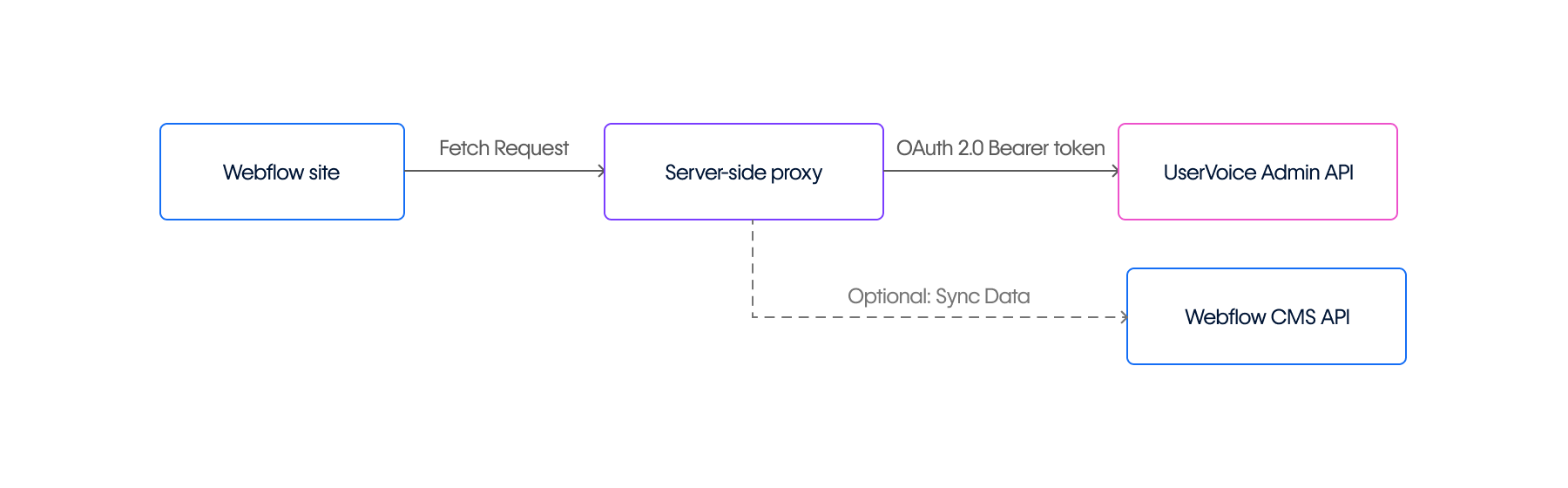
Your Webflow site communicates with a proxy server, which authenticates against the UserVoice Admin API using OAuth 2.0 Client Credentials flow. The proxy securely stores API credentials in environment variables and manages token acquisition and refresh.
Prerequisites
Set up your UserVoice account
- Create a UserVoice account and set up a forum through the admin console settings
- Generate API credentials in Admin Console under Settings → Integrations → UserVoice API keys
- Create a "Trusted API Client" and check the "Trusted" checkbox as documented in the API Key documentation
- Save your Client ID and Client Secret securely
- Note your subdomain (the
yourcompanyportion ofyourcompany.uservoice.com)
Configure your Webflow workspace
- Ensure your workspace uses a plan that supports custom code
- Verify you have Admin or Owner workspace permissions (required to register apps and manage API credentials)
- For CMS synchronization, register an app in your workspace settings to generate Webflow OAuth credentials
Server-side proxy implementation
Hosting options
Implement a server-side proxy component using one of these approaches:
- Webflow Cloud (recommended for staying on-platform): Deploy a Next.js or Astro application alongside your Webflow site using Webflow Cloud. This approach is more complex than standalone serverless functions but keeps your entire stack within Webflow's ecosystem and eliminates separate hosting management.
- Standalone serverless functions: Use AWS Lambda, Cloudflare Workers, Vercel, or Netlify Functions for lightweight, cost-effective deployments.
- Traditional server infrastructure: For applications requiring more control over the runtime environment.
Proxy requirements
Your proxy must:
- Store UserVoice API credentials (Client ID and Client Secret) securely in environment variables
- Generate and cache OAuth 2.0 Client Credentials access tokens (valid for 7,200 seconds)
- Validate incoming requests originating from your Webflow domain
- Validate and allowlist requested resources to prevent arbitrary endpoint access
- Proxy authenticated requests to UserVoice Admin API v2 endpoints using Bearer token authorization
- Forward UserVoice API responses to the client while monitoring rate limit headers
- Implement exponential backoff retry logic for handling rate-limited responses (HTTP 429)
Configure CORS headers on your proxy to allow requests from your Webflow domain.
Authentication flow
UserVoice implements OAuth 2.0 Client Credentials for server-side applications. The flow:
- Your proxy requests an access token by sending client credentials
- UserVoice returns a bearer token valid for 7,200 seconds (2 hours)
- Include the token in the
Authorization: Bearer {token}header for all API requests
Token acquisition:
curl https://SUBDOMAIN.uservoice.com/api/v2/oauth/token \
  --data "grant_type=client_credentials&client_id=KEY&client_secret=SECRET"
Response:
{
  "access_token": "096e8ae9c6a3c039",
  "token_type": "bearer",
  "expires_in": 7200
}
Example proxy implementation
// Proxy implementation for serverless platforms (AWS Lambda/Vercel/Netlify)
// Note: Uses native fetch (Node.js v21+). For older Node versions, install node-fetch.

// Token cache (use Redis/DynamoDB in production for multi-instance deployments)
let cachedToken = null;
let tokenExpiry = 0;

// Endpoint allowlist - only these resources can be requested
// This prevents client-side code from accessing arbitrary API endpoints
const ALLOWED_RESOURCES = {
  'suggestions': '/api/v2/admin/suggestions',
  'forums': '/api/v2/admin/forums',
  'users': '/api/v2/admin/users',
  'comments': '/api/v2/admin/comments'
};

async function getAccessToken() {
  if (cachedToken && Date.now() < tokenExpiry) {
    return cachedToken;
  }

  const response = await fetch(
    `https://${process.env.USERVOICE_SUBDOMAIN}.uservoice.com/api/v2/oauth/token`,
    {
      method: 'POST',
      headers: { 'Content-Type': 'application/x-www-form-urlencoded' },
      body: `grant_type=client_credentials&client_id=${process.env.USERVOICE_CLIENT_ID}&client_secret=${process.env.USERVOICE_CLIENT_SECRET}`
    }
  );

  const data = await response.json();
  cachedToken = data.access_token;
  tokenExpiry = Date.now() + (data.expires_in * 1000) - 60000; // Refresh 1 min early

  return cachedToken;
}

exports.handler = async (event) => {
  // Validate origin
  const origin = event.headers.origin || event.headers.Origin;
  const allowedOrigins = [
    'webflow.io',
    'yourdomain.com'  // Replace with your production domain
  ];

  const isAllowedOrigin = origin && allowedOrigins.some(domain => origin.includes(domain));
  if (!isAllowedOrigin) {
    return { statusCode: 403, body: JSON.stringify({ error: 'Forbidden' }) };
  }

  try {
    const { resource, method = 'GET', body } = JSON.parse(event.body);

    // Validate resource against allowlist
    const endpoint = ALLOWED_RESOURCES[resource];
    if (!endpoint) {
      return {
        statusCode: 400,
        body: JSON.stringify({ error: 'Invalid resource requested' })
      };
    }

    const token = await getAccessToken();

    // Proxy to UserVoice using validated endpoint
    const uvResponse = await fetch(
      `https://${process.env.USERVOICE_SUBDOMAIN}.uservoice.com${endpoint}`,
      {
        method,
        headers: {
          'Authorization': `Bearer ${token}`,
          'Content-Type': 'application/json'
        },
        body: body ? JSON.stringify(body) : undefined
      }
    );

    // Log rate limit status for monitoring
    const remaining = uvResponse.headers.get('X-Rate-Limit-Remaining');
    const limit = uvResponse.headers.get('X-Rate-Limit-Limit');
    if (remaining && parseInt(remaining, 10) < 10) {
      console.warn(`Rate limit warning: ${remaining}/${limit} requests remaining`);
    }

    const data = await uvResponse.json();

    return {
      statusCode: uvResponse.status,
      headers: {
        'Access-Control-Allow-Origin': origin,
        'Access-Control-Allow-Methods': 'GET, POST, PUT, DELETE',
        'Content-Type': 'application/json'
      },
      body: JSON.stringify(data)
    };

  } catch (error) {
    console.error('Proxy error:', error.message);

    return {
      statusCode: 502,
      headers: { 'Content-Type': 'application/json' },
      body: JSON.stringify({
        error: 'Integration error',
        message: error.message
      })
    };
  }
};


















Error handling and retry logic
Add exponential backoff for rate limiting and transient failures:
async function fetchWithRetry(url, options, maxRetries = 3) {
  for (let attempt = 0; attempt < maxRetries; attempt++) {
    const response = await fetch(url, options);

    if (response.ok) {
      return response;
    }

    // Handle rate limiting (HTTP 429)
    if (response.status === 429) {
      const retryAfter = response.headers.get('Retry-After');
      const waitTime = retryAfter
        ? parseInt(retryAfter, 10) * 1000
        : Math.pow(2, attempt) * 1000;

      console.log(`Rate limited. Waiting ${waitTime}ms before retry ${attempt + 1}/${maxRetries}`);
      await new Promise(resolve => setTimeout(resolve, waitTime));
      continue;
    }

    // Don't retry client errors (4xx) other than 429
    if (response.status >= 400 && response.status < 500) {
      throw new Error(`Client error: ${response.status}`);
    }

    // Retry server errors (5xx) with exponential backoff
    if (response.status >= 500) {
      const waitTime = Math.pow(2, attempt) * 1000;
      console.log(`Server error ${response.status}. Waiting ${waitTime}ms before retry`);
      await new Promise(resolve => setTimeout(resolve, waitTime));
      continue;
    }
  }

  throw new Error(`Failed after ${maxRetries} retries`);
}
Error handling summary:
Client-side communication
From your Webflow site, call the proxy using abstracted resource names (not raw endpoints):
// Request suggestions through the proxy
fetch('https://your-secure-proxy.com/api/uservoice', {
  method: 'POST',
  headers: { 'Content-Type': 'application/json' },
  body: JSON.stringify({
    resource: 'suggestions',  // Abstracted resource name, validated server-side
    method: 'GET'
  })
})
.then(response => response.json())
.then(data => {
  // Handle UserVoice data safely
  console.log(data.suggestions);
});
Security note: The proxy validates the resource parameter against an allowlist before constructing the actual API endpoint. This prevents client-side code from accessing arbitrary UserVoice API endpoints through your proxy.
UserVoice API reference
Common endpoints
The Admin API Reference documents all available endpoints. Add these to your proxy's ALLOWED_RESOURCES as needed:
Response structure
UserVoice API responses include the primary resource, related data via side-loading (using the includes parameter), and pagination metadata:
{
  "suggestions": [{
    "id": 303,
    "title": "Make the logo bigger",
    "body": "Description text",
    "created_at": "2012-07-19T14:23:16Z",
    "state": "published",
    "links": {
      "forum": 2002,
      "created_by": 1001
    }
  }],
  "forums": [{
    "id": 2002,
    "name": "Product Ideas"
  }],
  "pagination": {
    "page": 1,
    "per_page": 20,
    "total_records": 1
  }
}
See Associations & Side-loading and Pagination documentation for details.
Webhook integration
UserVoice webhooks enable real-time updates when feedback events occur.
Available events
Configure webhooks in UserVoice Admin Console under Integrations → Service Hooks:
Webhook security
UserVoice implements HMAC-SHA256 signature verification. Verify incoming webhooks using your SSO key (found in Admin Console: Settings → Web Portal → UserVoice Authentication):
const crypto = require('crypto');

function verifyWebhookSignature(payload, signature, ssoKey) {
  const computedSignature = crypto
    .createHmac('sha256', ssoKey)
    .update(payload)
    .digest('hex');

  return crypto.timingSafeEqual(
    Buffer.from(signature),
    Buffer.from(computedSignature)
  );
}

exports.webhookHandler = async (event) => {
  const payload = event.body;
  const receivedSignature = event.headers['x-uservoice-signature'];

  if (!verifyWebhookSignature(payload, receivedSignature, process.env.USERVOICE_SSO_KEY)) {
    return { statusCode: 401, body: 'Invalid signature' };
  }

  // Process webhook safely
  const data = JSON.parse(payload);
  // ... handle event
};
Note: UserVoice does not automatically retry failed webhook deliveries. Implement your own retry handling if needed.
Receiving webhooks
Deploy a serverless function to receive webhooks. You can also use Make or Zapier for no-code automation.
Rate limiting
UserVoice limits
UserVoice enforces API rate limits communicated through HTTP response headers:
X-Rate-Limit-Limit: Maximum requests allowed per time windowX-Rate-Limit-Remaining: Requests remaining in current windowX-Rate-Limit-Reset: Timestamp when rate limit resets
Limits vary by subscription tier. When exceeded, UserVoice responds with HTTP 429 and includes a Retry-After header.
Webflow limits
The Webflow API Rate Limits documentation specifies plan-based throttling:
Site Publish endpoints are further limited to one successful publish per minute.
Syncing feedback to Webflow CMS
Display feedback data in Webflow by syncing to a CMS collection.
Sync implementation
async function syncUserVoiceToWebflow(suggestions) {
  const items = suggestions.map(s => ({
    fieldData: {
      name: s.title,
      slug: s.title.toLowerCase().replace(/\s+/g, '-').replace(/[^\w-]/g, ''),
      description: s.body,
      votes: s.votes_count,
      status: s.state,
      'uservoice-id': String(s.id),
      'created-date': s.created_at
    }
  }));

  // Bulk insert to Webflow (max 100 per request)
  const response = await fetch(
    `https://api.webflow.com/v2/collections/${COLLECTION_ID}/items/bulk`,
    {
      method: 'POST',
      headers: {
        'Authorization': `Bearer ${WEBFLOW_TOKEN}`,
        'Content-Type': 'application/json'
      },
      body: JSON.stringify({ items })
    }
  );

  return response.json();
}
Use UserVoice's date range filters (updated_before, updated_after) for efficient incremental synchronization.
SSO implementation
For seamless authentication between your app and UserVoice, implement SSO using JWT tokens.
Server-side token generation
const jwt = require('jsonwebtoken');

function generateUserVoiceToken(user, ssoKey) {
  const payload = {
    guid: user.id,
    email: user.email,
    display_name: user.name,
    expires: Math.floor(Date.now() / 1000) + 3600 // 1 hour
  };

  return jwt.sign(payload, ssoKey, { algorithm: 'HS256' });
}

exports.handler = async (event) => {
  const user = JSON.parse(event.body);
  const token = generateUserVoiceToken(user, process.env.USERVOICE_SSO_KEY);

  return {
    statusCode: 200,
    body: JSON.stringify({ token })
  };
};
Client-side integration
If using the UserVoice widget alongside API integration:
fetch('https://your-proxy.com/generate-uv-token', {
  method: 'POST',
  body: JSON.stringify({
    id: currentUser.id,
    email: currentUser.email,
    name: currentUser.name
  })
})
.then(res => res.json())
.then(data => {
  UserVoice.push(['identify', {
    sso: data.token
  }]);
});
Verification and testing
- Test token acquisition: Use curl or Postman to verify OAuth flow works with your credentials
- Test proxy endpoint: Confirm your proxy responds to requests from your Webflow domain with proper CORS headers
- Test resource validation: Verify the proxy rejects invalid resource names
- Test webhook signatures: Send test webhooks and confirm HMAC verification works
- Monitor rate limits: Check
X-Rate-Limit-Remainingheaders during testing
Troubleshooting
For additional debugging, consult the UserVoice API Technical Details and Webflow Developer Documentation.



















