










Build secure, subscription-based e-learning platforms with Webflow CMS and Vimeo's protected video delivery.
Building secure, membership-based e-learning platforms requires combining content management, video delivery, and access control across multiple systems. This guide explains how to architect gated educational content using Webflow's CMS and hosting with Vimeo's privacy controls and player API.
Purpose and scope
This integration enables developers to create production-grade e-learning platforms with course content stored in Webflow CMS, protected video delivery through Vimeo, and member-based access control. The architecture supports subscription tiers, progress tracking, and secure content delivery without requiring dedicated LMS infrastructure.
Architecture overview
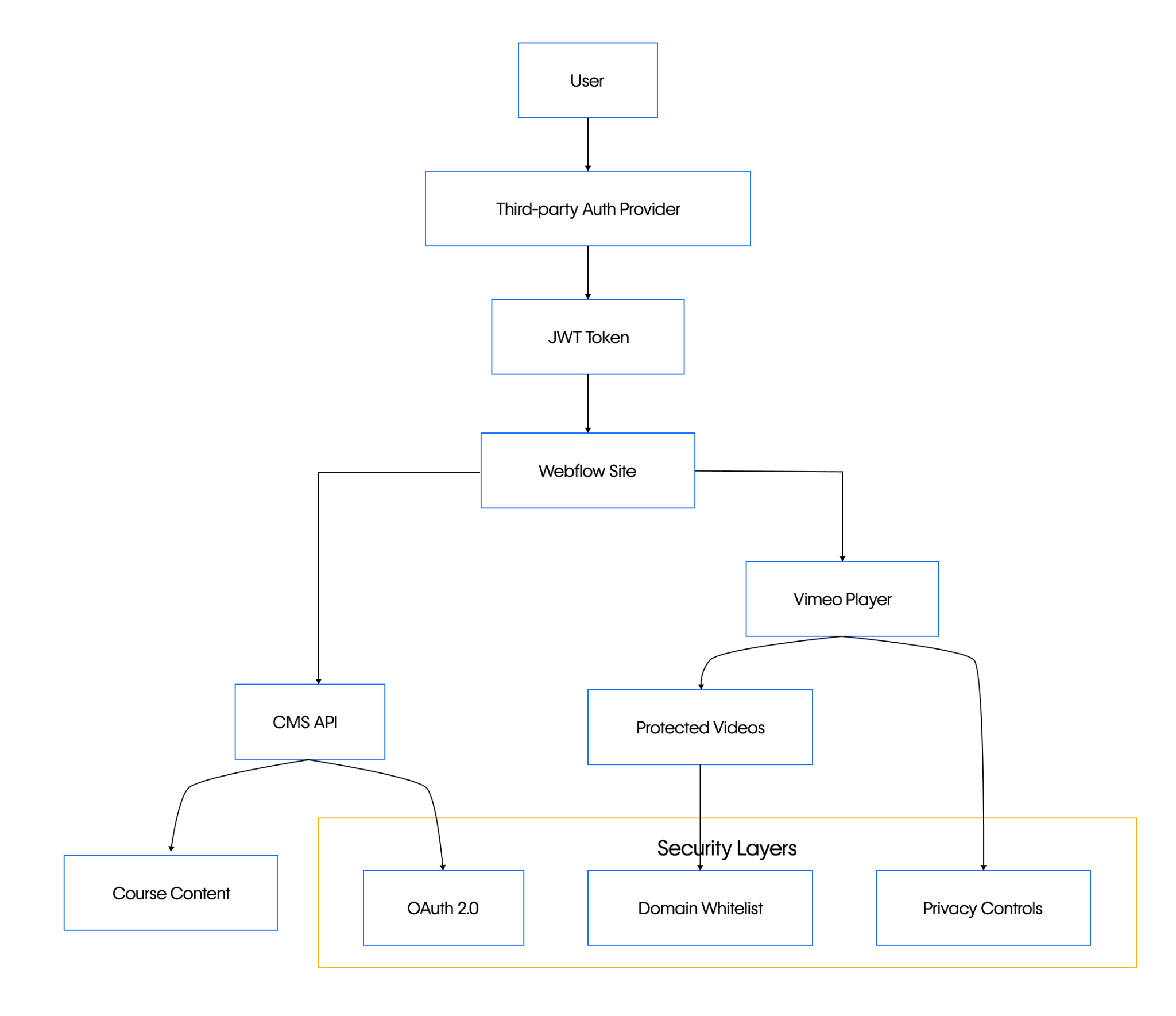
The system combines three primary components: a third-party authentication provider for user management, Webflow CMS for course content structure, and Vimeo for secure video delivery. User authentication flows through OAuth 2.0 tokens, content access validation occurs at the API layer, and videos are restricted through domain whitelisting and privacy controls.
Implementation concepts
Set up third-party authentication
Modern implementations require external authentication providers due to Webflow's native User Accounts deprecation by January 29, 2026. Configure your chosen provider (Auth0, Authgear) to issue JWT tokens containing user permissions and membership tiers.
At a high level, you'll:
- Set up your third-party authentication provider account
- Configure OAuth 2.0 application settings
- Generate JWT tokens with custom claims for course access levels
Configure Webflow CMS for course structure
Webflow’s CMS Collections support 16 field types, giving you the flexibility to build linked collections for courses, lessons, and user progress.
At a high level, you'll:
- Design course collections with reference fields
- Set up conditional visibility based on user authentication status
- Configure CMS API access for programmatic content management
Recommended collection structure: Use a three-tier approach with Courses, Lessons, and optional Modules collections connected through reference fields for scalable content organization.
Implement Vimeo privacy controls
Vimeo’s privacy system provides multiple security layers through API-configurable settings and domain restrictions. Videos require both the privacy.view and privacy.embed fields to be configured for secure gated delivery.
Setting privacy.embed to “whitelist” restricts embeds to approved domains, which can be managed either via the Vimeo API (using the PUT /videos/{video_id}/privacy/domains/{domain} endpoint) or directly in the Vimeo UI.
Note that domain-level embed restrictions are only available on paid Vimeo plans. The privacy.view field separately controls visibility on Vimeo.com, with options like "unlisted" or "password" for access control.
At a high level, you'll:
- Configure video privacy settings via API
- Set up domain-level restrictions for embed control
- Implement Player.js SDK for interactive learning features
Videos should use "Hide from Vimeo" privacy setting with domain whitelisting restricted to your Webflow site's domain.
Configure secure video embedding
The Vimeo Player.js SDK enables custom video experiences with progress tracking and interactive features through its comprehensive JavaScript API. Implementation requires proper OAuth 2.0 authentication and configuration of security parameters including privacy.view and privacy.embed settings for domain-restricted embedding.
At a high level, you'll:
- Include Player.js SDK in your Webflow custom code
- Configure embed parameters for security and branding
- Implement event listeners for progress tracking
Custom code implementation is limited to 50,000 characters per block, requiring modular JavaScript architecture for complex functionality.


















Configuration patterns
Multi-layered security implementation
Secure gated content requires a multi-layered authentication architecture combining platform-level user authentication, API-level authorization, and content-level delivery controls.
According to industry-standard patterns, this typically involves: (1) external authentication provider authentication with JWT tokens encoding membership permissions, (2) OAuth 2.0 bearer token authentication for API access to video platforms, and (3) domain-level privacy restrictions combined with time-limited signed URLs for secure content delivery.
Layer 1: Platform authentication Configure your third-party authentication provider (such as Auth0 or Authgear) to issue JWT tokens with custom claims encoding course access permissions. Validate tokens client-side before displaying gated content and server-side before API requests.
Note: Webflow is discontinuing its native User Accounts feature by January 29, 2026, making third-party authentication providers the required approach for new implementations.
Layer 2: API authorization Implement OAuth 2.0 for Webflow CMS access and Vimeo API authentication for video management. Use bearer tokens in authorization headers for all API requests.
Layer 3: Content delivery Configure Vimeo videos with domain whitelisting and consider signed URLs for time-limited access. The AWS reference architecture demonstrates industry-standard patterns for secure media delivery.
Conditional content display
Webflow's conditional visibility system enables element-level content gating based on user authentication status and CMS field values.
Configure visibility conditions through the element settings panel to show/hide content based on:
- User login status
- Collection field values (completion status, access levels)
- Custom attributes set via Webflow's Browser API
According to the Browser API documentation, the setAttributes() method enables attaching custom learner attributes (course progress, completion status, quiz scores) to user profiles for personalization and analytics.
This granular control complements page-level access restrictions for sophisticated learning pathways.
Progress tracking architecture
Without native learning analytics, implement custom progress tracking through Vimeo Player.js events and Webflow CMS API updates.
Use Player.js event listeners for timeupdate and ended events to track viewing progress, then update user progress records via Webflow's CMS API. Consider webhook integration for real-time progress synchronization.
Verification approach
Authentication flow validation
Test the complete authentication workflow from user login through content access. Verify JWT token validation, API authorization, and content display permissions function correctly across different membership tiers.
Key validation points:
- Token issuance and validation
- API request authorization
- Content visibility based on user permissions
- Session management and renewal
Video security verification
Confirm Vimeo privacy controls prevent unauthorized access. Test domain restrictions, privacy settings, and embed security across different contexts.
Validation checklist:
- Videos inaccessible on unauthorized domains (domain whitelisting enforced)
- Privacy settings restrict access via privacy.view and privacy.embed fields
- Player controls configured per embed parameters (autoplay, controls, color, etc.)
- Security parameters implemented (h parameter for unlisted videos, sharing buttons disabled)
Content management workflow
Verify CMS collection relationships, conditional visibility rules, and API integrations function as designed. Test content publishing workflows and user progress tracking.
Advanced considerations
Scalability patterns
Large-scale e-learning platforms require consideration of API rate limits, content delivery optimization, and user management at scale. Both Webflow and Vimeo implement rate limiting that varies by subscription plan, though specific numerical limits are not publicly disclosed and require contacting support for plan-specific details.
Plan for CDN integration, API request caching, and database optimization for user progress data as your platform grows.
Migration from native User Accounts
Webflow is discontinuing its native User Accounts feature by January 29, 2026. All new e-learning implementations must adopt third-party authentication providers instead.
Existing Webflow sites using native User Accounts must migrate to third-party authentication before the January 29, 2026 deadline. Plan the migration to preserve existing user data and access permissions while transitioning to external authentication providers like Auth0 or Authgear.
Consider data export requirements and user communication strategies for the transition period.
Learning standards integration
Vimeo provides native LMS integration capabilities through SCORM and xAPI support for e-learning standards compliance.
Implement learning standards through custom integration layers and third-party service connections rather than expecting native platform support, as Webflow and Vimeo lack built-in SCORM, xAPI, quiz functionality, and progress tracking capabilities.
This architecture provides a foundation for sophisticated e-learning platforms while leveraging each platform's strengths: Webflow for content management and hosting, Vimeo for secure video delivery, and third-party providers for robust authentication.



















