



Your homepage is the cornerstone of your digital presence — and you have mere seconds to prove its value to visitors.
According to Nielsen, users spend an average of 10–20 seconds evaluating a homepage before deciding whether to stay. A compelling homepage provides additional benefits, such as increasing organic traffic through an SEO boost.
However, crafting an engaging homepage requires distilling complex information (like your value proposition) into digestible pieces for different audience segments. The key to success lies in continuously experimenting with and iterating on the key elements of your homepage.
In this post, we’ll break down the key components of an engaging homepage and how to optimize each one to turn visitors into buyers.
What makes a good homepage experience?
A good homepage design tells visitors it's worth their time to explore your website by providing a comprehensive yet focused view of your business. Think of your homepage as a strategic gateway — not a complete product manual (that’s what product pages are for) or an exhaustive FAQ (leave that for FAQ or support pages). Instead, its goal is to build trust with users and confidently guide them to their next step.
To accomplish this goal, businesses should pay attention to the following principles across their homepage:
- Attractive, eye-catching visuals
- Clear messaging
- Powerful social proof
- Effortless user experience
- Search and AI visibility
- Personalization based on user segments
Let’s break down each of these elements.
Attractive, eye-catching visuals
Appealing visuals grab a user’s attention and clearly show, rather than tell, your brand’s value proposition. Quality visuals create positive brand associations and encourage users to spend more time on your homepage.
Businesses have many options when choosing which visuals to add to their homepage, including lifestyle photography, background videos, animation, and high-quality product photos. The right choice depends on your brand, product, and audience. Consider these tips when selecting your homepage’s visuals:
- Align images with the brand color palette: Your brand's color palette helps evoke the emotions you want your audience to feel when they interact with your brand. Verify that your visuals align with it to maintain consistency.
- Add compelling imagery above the fold: The hero section is the first section users see, so place your strongest visuals there.
- Use a carousel for related visuals: Use components like image carousels to display product screenshots, resources, or other features.
- Optimize video performance: Large videos can slow down sites, increase bounce rates, and affect SEO performance. Before adding a video, ask whether it significantly improves the user experience, creates performance bottlenecks (using tools like Google Lighthouse), and meets key accessibility requirements, such as playback controls.
- Experiment continuously: Try different media types, formats, and sizes to see what works best for showcasing your value proposition.
Ultimately, the right visual strategy fit will depend on the brand, product, and audience. For example, Hillbrook, a real estate company in New Zealand, used evocative, beautiful photography to showcase its value proposition of “authentic luxurious real estate.”

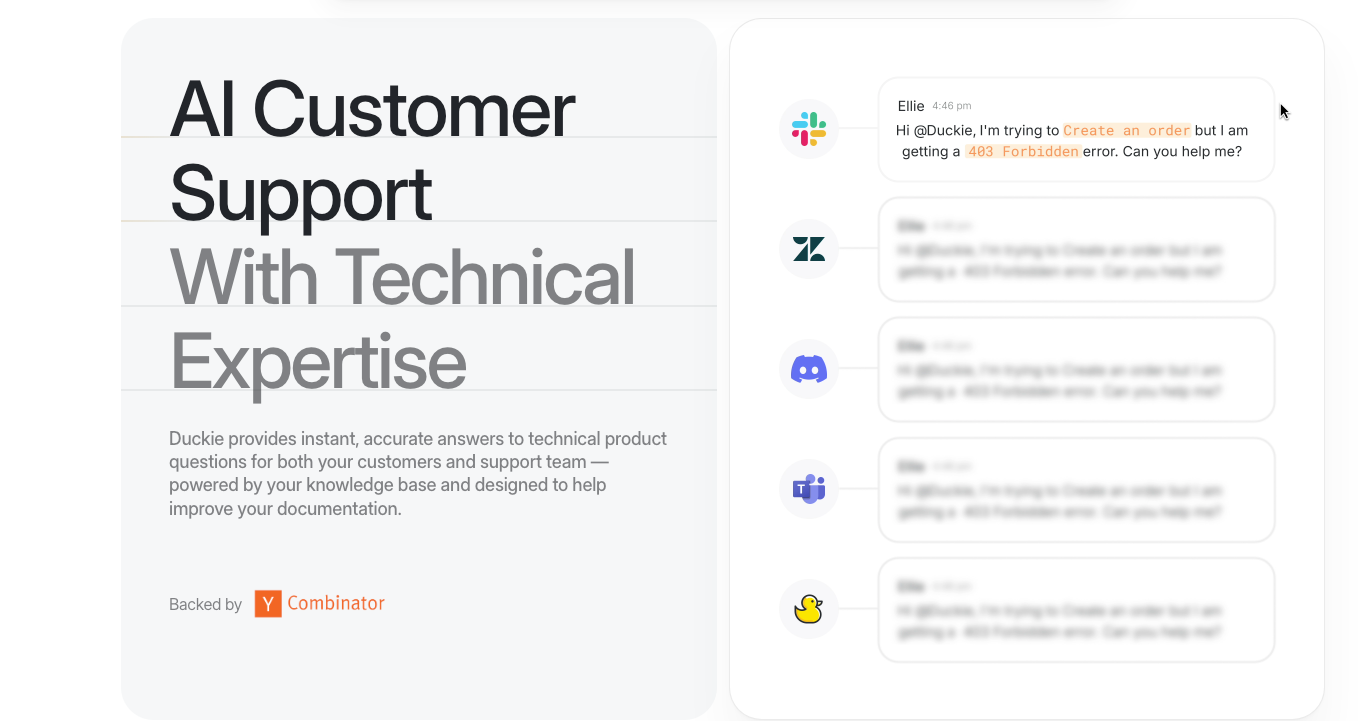
Meanwhile, Duckie, an AI support assistant for technical users, uses animation to show how its product works. This helps users easily understand how the product might integrate with their workflow.
Clear messaging
Given the limited time to capture a user’s attention, refining messaging and copy is a significant opportunity for homepage optimization. Messaging is how you speak about your brand; copy is how that messaging translates to actual words on the page. Let’s go over how you can bring this to life in the headline and body copy:
Headline
The headline encapsulates the business's mission and philosophy in a few impactful words. Think of it as a quick sales pitch for your business — it should make sense to all potential target users (regardless of their level of awareness), capture your unique voice, and avoid overly “salesy” language that might alienate visitors.
Ask yourself these questions when crafting your headline:
- What’s the brand’s value proposition? What problem are you solving for your customers, and why does that matter to them?
- What do you want visitors to feel when they read your headline?
- What’s the most important thing your audience needs to know when they learn about your product? What’s the “hook” that gets them excited about your business?
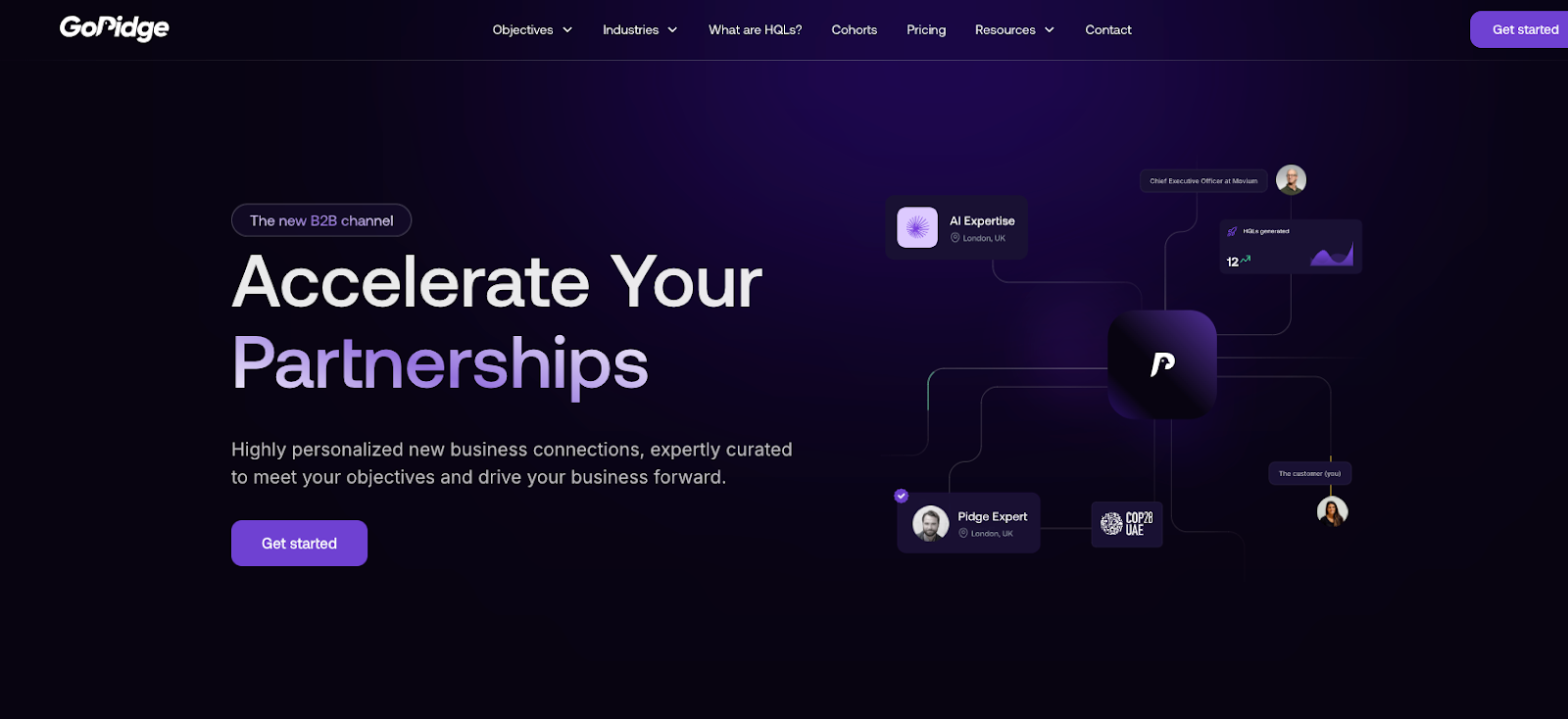
Consider GoPidge, a platform that drives growth for B2B platforms. Since GoPidge’s solution provides value to multiple aspects of a customer’s business, their headline changes the last word in the headline to highlight the breadth of use cases. Specifically, they mention how their product can accelerate a platform’s partnerships, financing, market intelligence, talent acquisition, business growth, and lead generation.
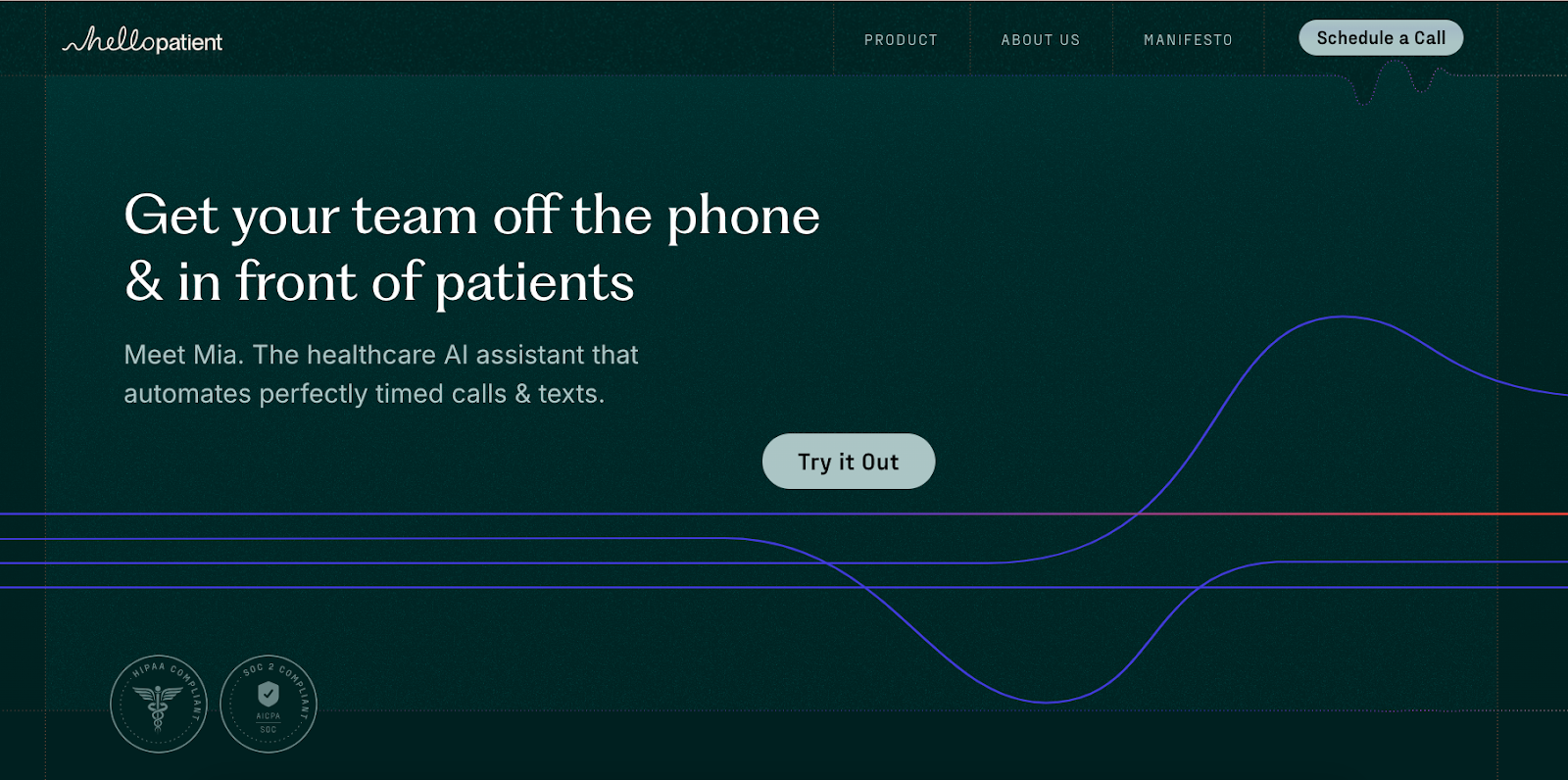
On the other hand, Hello Patient, a healthcare AI assistant, uses the headline to speak directly to its target audience, with a straightforward value prop (i.e., team efficiency).
Body copy
Your homepage’s body copy translates a brand's message into compelling words that work alongside your visuals and headline to tell your product's story. Think of it as the supporting actor to your visual elements — adding depth and detail without stealing the show.
When writing body copy, keep it as tight as possible. Attention spans are limited, so communicating concisely is key to getting your message across without losing your audience.
Here are some other tips when refining your homepage’s body copy:
- Align copy with brand voice: Your brand voice is your brand’s personality expressed through words, tone, and other design decisions. Double-check that your copy’s tone aligns with the brand voice to reinforce your brand's personality across your website.
- Focus on action-oriented statements: Write clear, impactful statements that move visitors toward action, such as “Hire top talent in half the time.”
- Prioritize clarity over cleverness: Remove any industry jargon or insider language that might prevent first-time visitors from quickly understanding what you do.
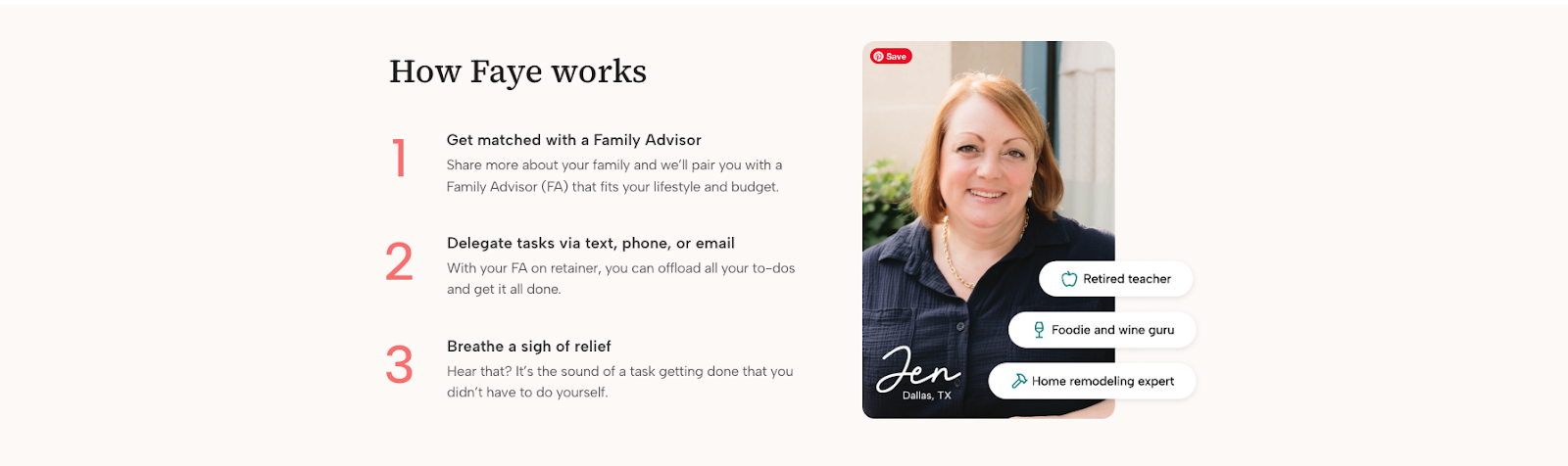
Let’s look at an example: Faye, a platform connecting families with executive assistants (dubbed “Family Advisors”), is a concept most visitors haven't encountered before. To educate users, they break down the process into three simple steps, each with a bold headline that captures the key point. Even without reading the details, visitors can quickly grasp how the service works by scanning the headlines.
Powerful social proof
Users need evidence that your product delivers on its promises. This is especially true for digital products, as users can only discover their value after trying them. Additionally, strong social proof builds brand trust and can boost your SEO ranking to drive more organic traffic.
Here are five ways businesses can add social proof to their homepage:
- Customer logos: Showcasing well-known customers builds trust with potential visitors and validates your product's value (but always ask for permission before using a customer’s logo!)
- Testimonials: Solicit feedback or quotes that highlight successful customer experiences. Then, expand into detailed case studies that tell the full story.
- Reviews: You can collect them by adding functionality to your website so users can leave reviews, or by importing them from platforms like Google, TrustRadius, and G2.
- Awards: Showcase awards, like Fast Company’s Most Innovative Companies, to boost brand and product credibility.
- Certifications: Add any relevant certifications that showcase your product’s capabilities and regulatory compliance, especially relevant for healthcare or financial services businesses.
If you aren’t sure which type of social proof to display, test different imagery, quotes, data, or statistics to see what drives engagement.
Effortless user experience
Your homepage's user experience (UX) connects all your visuals, messaging, and social proof. Without a good UX, these elements fall flat — or worse, actively frustrate visitors. Let’s break down the key components of a compelling homepage user experience:
Page layout
A good homepage layout organizes all page elements in a consistent, coherent manner. Many websites separate their page into distinct sections that communicate different information. For example, one section might focus on how a product works, whereas another might focus on social proof.
Optimize your homepage layout by considering these tips:
- Plan your layout: Before starting any designs, outline the sections your homepage needs — like a hero area, product highlights, testimonials, and a clear call-to-action (CTA).
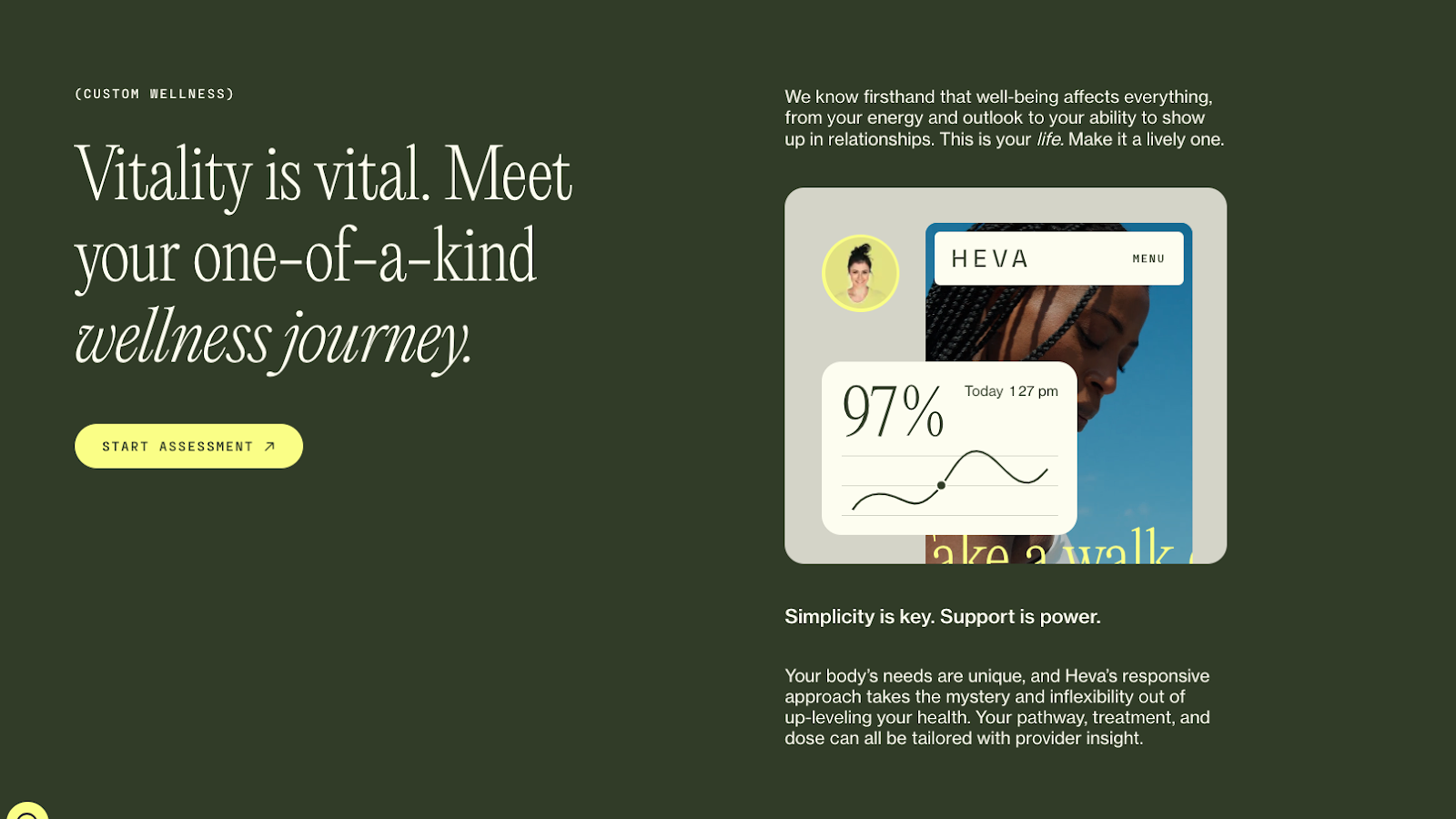
- Create a clear visual hierarchy: Use color, size, and whitespace to clarify the homepage's visual hierarchy, helping users find the most relevant section for their query. For example, Heva Health uses bold headlines and animations to get users’ attention (while leaving the details for the supporting copy), allowing visitors to absorb information at their own pace.
- Put your CTA front and center: Position your primary CTA above the fold. Make sure the button tells visitors what will happen when they click (e.g., "Start Free Trial" or "View Demo”).
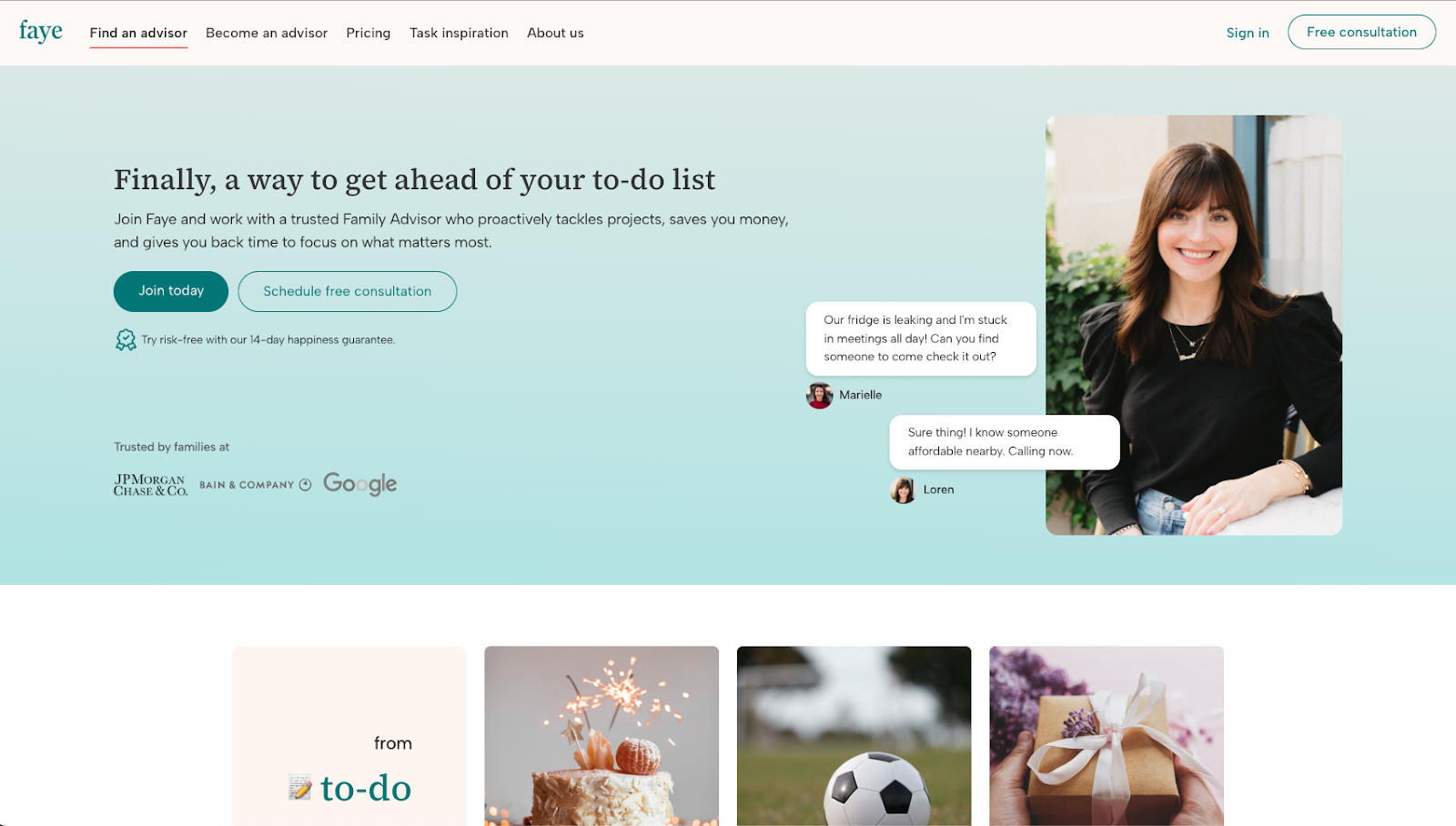
- Experiment with content cutoffs: When visitors see partially revealed content, their curiosity drives them to scroll down and discover more, driving engagement. Take Faye: the homepage has a content cutoff strategy on desktop to encourage users to scroll down and see all the projects they could accomplish by hiring a Faye family advisor.


















Site navigation
A well-organized navigation menu helps users find the content they need quickly, keeping them engaged. When deciding on your site’s navigation strategy, keep these principles in mind:
- Align your navigation with the site design: The navigation should be a natural extension of your website design. For more guidance, check out our navigation bar design best practices.
- Make site navigation compatible across devices: When implementing your site navigation, verify that it’s visible and that users can click elements on all devices, including mobile and desktop.
- Validate your navigation: Use clickable prototypes or simple tests to confirm visitors can navigate your homepage seamlessly.
Mobile responsiveness
As more users primarily use mobile devices to navigate the Internet, your homepage must function seamlessly on phones, tablets, and desktops. Follow these tips to create a device-agnostic homepage:
- Implement responsive design to create flexible elements and content that automatically adapt to a user’s device, ensuring mobile friendliness.
- Regularly test mobile compatibility with these optimization tools to test and catch issues with mobile responsiveness on your homepage.
- Consider using visual web development platforms such as Webflow, which automatically create mobile-friendly designs, eliminating the need for custom code.
Performance
A delay of a single second in page load time can result in 11% fewer page loads and up to 7% loss in conversion. Therefore, performance is a crucial factor in ensuring a seamless user experience. Here are some tips for optimizing your homepage’s speed:
- Benchmark using Google’s Core Web Vitals framework, which provides three speed metrics that you can use to assess your site performance.
- Optimize media files by using lightweight images and lazy loading, since visuals are major performance detractors that can slow down the homepage.
- Use tools like Google Lighthouse or Semrush to identify opportunities to boost your site’s performance. Webflow users can use Webflow Analyze to visualize all performance metrics in one centralized dashboard.
Search and AI visibility
Having a great homepage doesn’t matter if users can’t find you. That’s why it’s important to create a homepage that can be easily discovered by search engines and increasingly, AI platforms.
SEO fundamentals
To rank well in search results, your homepage needs a clear site structure and well-labeled content for SEO crawlers to effectively parse and index it—without losing sight of human visitors reading your page. Here are some best practices to optimize your homepage for SEO:
- Include your primary keyword: Add it to your title tag and meta description so crawlers can associate your site with relevant user queries.
- Create a clear page structure: Use straightforward URLs (e.g., “abc.com/pricing”) and organize content with clear headers to help visitors and crawlers understand your homepage.
- Add schema markup: This structured data helps search engines better understand your business and display additional details in search results, like prices or product pages.
- Deliver a fast, mobile-friendly UX: Search engines use site speed and mobile-friendliness as key ranking signals, so ensure your homepage loads quickly across all devices.
AEO best practices
Semrush predicts that by 2028, AI search visitors will surpass traditional search visitors. It makes sense — AI systems make it much easier for users to find what they’re looking for, and as a result, they’re 4x more likely to convert. But what can you do to make sure that you’re showing up in AI-powered search results when it matters most?
That’s where AEO (Answer Engine Optimization) comes in. AEO increases the likelihood that popular AI systems, such as ChatGPT, Gemini, Claude, or Perplexity, cite your content when answering user queries. Here are some tips to help AI models find and reference your homepage:
- Use question-based headers: When people query AI systems, their questions are more conversational. Write headings that meet visitors where they’re at by using questions in your section headers, like "What is [your business]?”
- Give direct answers: Start each section with clear, quotable statements that directly answer your header question to make it easy for AI systems to extract and cite your content.
- Refresh homepage regularly: AI systems prioritize content freshness when evaluating sources, so update it quarterly with new information, testimonials, or feature announcements.
- Include authoritative content: Add credible statistics, original research, or unique insights about your industry that build authority with AI systems.
Personalization based on user segments
Every visitor arrives at your homepage with different needs. Here's how to personalize key elements for each audience:
- Messaging: Adapt your headlines and copy to match the user's specific needs. For new visitors, your messaging might be more general and inviting, whereas for existing visitors, create personalized welcomes.
- CTA: Direct each audience to their next step by changing the CTA, like free trials or demos for new visitors and product recommendations or upsells for existing ones.
- Images: Select visuals that speak to each visitor's journey. Show product overviews to new customers and advanced capabilities to existing customers.
Use Webflow Optimize to easily create unique homepage versions for different audience segments. The tool helps you personalize your homepage’s components for each audience, including headline, copy, messaging, and CTA, resulting in a more engaging and tailored experience. You can even pair it with tracking platforms like Google Analytics to reveal how visitors interact with your changes, which you can use to refine your homepage further.
Scale your homepage testing with Webflow
Your homepage isn’t a set-and-forget project. As you gain data on how your visitors behave, refine your visuals, messaging, and layout based on real insights. This iterative approach helps keep your homepage competitive even as audiences evolve.
Webflow Optimize takes the legwork out of continuous optimization, helping you understand and scale what’s performing well. Teams can run experiments quickly and easily, comparing different content variations, headlines, images, and CTAs across the homepage to boost engagement and conversions — all in a few clicks. Maximize your homepage’s potential and try Webflow Optimize today.

Discover what performs best and deliver it at scale
Maximize conversions with rapid insights, tailored visitor experiences, and AI-powered delivery.