






Enhancement
Edit Mode
Edit content globally in a component as a Marketer or Content editor
Marketers and content editors can edit global content inside components.
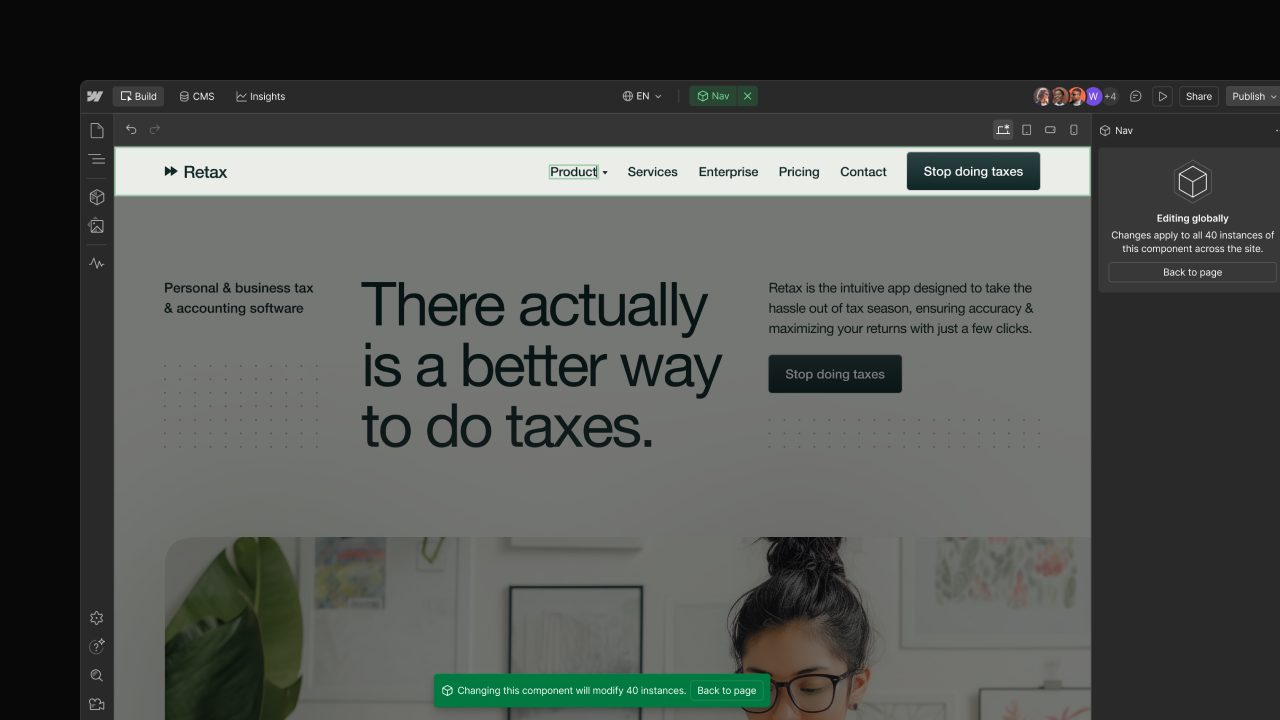
Marketers and content editors can now edit content globally in components. The canvas shows clearly when a change applies to all instances, so you can update content safely without guessing. This feature is available for the Marketer and Content editor roles on all plan types.
What’s new
- Edit unbound content in components — Text, links, and images that aren’t bound to props can be edited inside a component. Changes made to unbound content are made globally, affecting all instances of the component. Editing content bound to a prop remains unchanged: Marketers and Content editors can edit all component properties that have been configured by their designer or developer.
- Clear global editing indicators — Unbound content edits apply to all instances. Users are placed in a focused state & a notification bar on canvas confirms when the changes being made impact all instances.
- Editing interactive elements in a component — Building on our prior release of editing interactive elements, marketers and content editors can now edit interactive elements inside of components (e.g. a dropdown in a nav bar component).
- Custom role permissions — On Enterprise & Enterprise Partner plans, admins can control who can edit global component content via a new custom role permission for the Content Editor and Marketer roles.
Why it matters
Previously, Marketers and Content editors could not edit unbound content inside components when working in Webflow despite having this capability in the legacy Editor. This release brings parity for core content editing workflows and makes it safe and clear when updating global content.
How to get started
- Open a page that uses a global component (e.g., with a navbar or footer)
- Double-click static text, a link, or an image inside of the component. You’ll enter a focused state and see a notification when the edit applies globally
How to manage risky content updates
As a designer or developer, if you're concerned about a client or teammate making risky content updates, you have a few options:
- On a per-element basis, you can control which elements are editable by Marketers and Content editors using the Editing permissions in Element Settings
- If you're on Enterprise, you can control who can make global content updated using custom roles
Availability
This feature is available for the Marketer and Content editor roles on all plan types. The custom role permission for who can edit global component content is available on Enterprise and Enterprise Partner plans.
Related updates





















Commencez gratuitement
Essayez Webflow aussi longtemps que vous le souhaitez grâce à notre plan Starter gratuit. Achetez un plan de site payant pour publier, héberger et débloquer des fonctionnalités supplémentaires.
Essayez Webflow aussi longtemps que vous le souhaitez grâce à notre plan Starter gratuit. Achetez un plan de site payant pour publier, héberger et débloquer des fonctionnalités supplémentaires.