






Enhancement
Interactions
Manipulate Rive animations using Interactions with GSAP
You can now control your Rive animations via Interactions with GSAP using Rive's view model data binding.
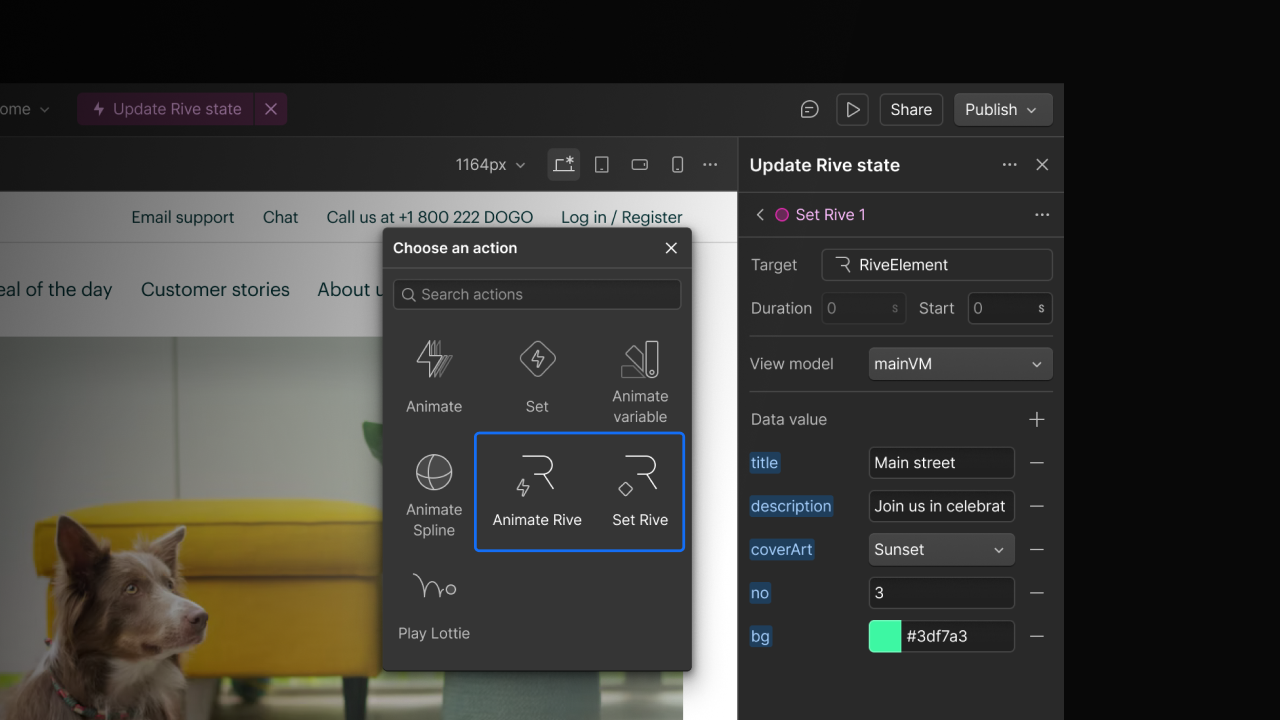
You can now control Rive animations directly from the Webflow canvas using interactions with GSAP. Simply bind interaction triggers to data inside your Rive scenes, and they can respond in real time as visitors scroll, click, or navigate.
What you can do today:
- Control ViewModel data such as artboards, numbers, text, colors, booleans, and enums exposed by your Rive file.
- Transition between different artboard states within a single Rive component, enabling multi-scene animations without multiple embeds.
- Kick off Rive's built-in state machine transitions at exactly the right moment in your interaction timeline.
- Sharper vector rendering with WebGL2: The integration uses the latest @rive-app/webgl2 package, which enables vector feathering for smoother anti-aliased edges on shapes, text, and strokes.
- Rive property changes are sequenced on the same GSAP timeline as your other Webflow animations, reversing cleanly when a timeline rewinds.
How it works in the Designer:
Select a Rive element, open the Interactions panel, and choose the "Set Rive" or “Animate Rive” action types. Your loaded .riv file's ViewModels and properties are automatically available to modify. Place them on your timeline alongside transforms, opacity changes, or any other animation. Color properties accept hex, RGB, HSL, or named colors and are converted automatically. Original values are captured at the start of each interaction, so reverse playback always restores the initial state.
Related updates




















Commencez gratuitement
Essayez Webflow aussi longtemps que vous le souhaitez grâce à notre plan Starter gratuit. Achetez un plan de site payant pour publier, héberger et débloquer des fonctionnalités supplémentaires.
Essayez Webflow aussi longtemps que vous le souhaitez grâce à notre plan Starter gratuit. Achetez un plan de site payant pour publier, héberger et débloquer des fonctionnalités supplémentaires.