






Graphite
Connect Graphite with Webflow to audit and optimize your site for SEO and AEO using the Graphite app, CMS templates, and the Webflow CMS API.

Most Webflow sites with a content operation reach the same bottleneck: metadata lives scattered across individual page settings, there's no fast way to audit what's indexed or how LLMs are citing the site, and applying SEO recommendations across hundreds of CMS pages means opening each one manually. Graphite solves this on two levels.
The Graphite app handles the technical layer, including bulk metadata editing, schema markup, robots.txt configuration, and AI visibility tracking directly inside Webflow. For strategy and scale, Graphite (the agency) works with marketing and growth teams to identify which pages drive the most organic and AI-driven traffic, then helps implement and measure those changes through Webflow's CMS and API.
What is Graphite: Graphite is an AI-powered SEO and answer engine optimization (AEO) agency that works on content planning, on-page improvements, technical SEO, and AI visibility initiatives. Graphite also builds tooling to support this work: the Graphite app on the Webflow Marketplace gives Webflow teams a fast way to manage metadata, schema, and LLM access controls without switching tools.
How to integrate Graphite with Webflow
The Graphite-Webflow integration works across three methods that suit different levels of implementation. The Graphite Webflow app handles metadata, schema, robots.txt, and AI tracking directly inside Webflow. This is where most teams start. Template-level CMS changes let you propagate SEO improvements across entire collections without editing individual pages. Webflow's CMS API gives developer teams programmatic control over collection items at scale, informed by Graphite's strategy. Most implementations combine two or more of these depending on the size of the content operation.
Install the Graphite app
Install the Graphite app from the Webflow Apps Marketplace to access bulk metadata editing, schema markup, robots.txt configuration, and AI visibility tracking inside Webflow. The app is approved by Webflow and includes a free plan.
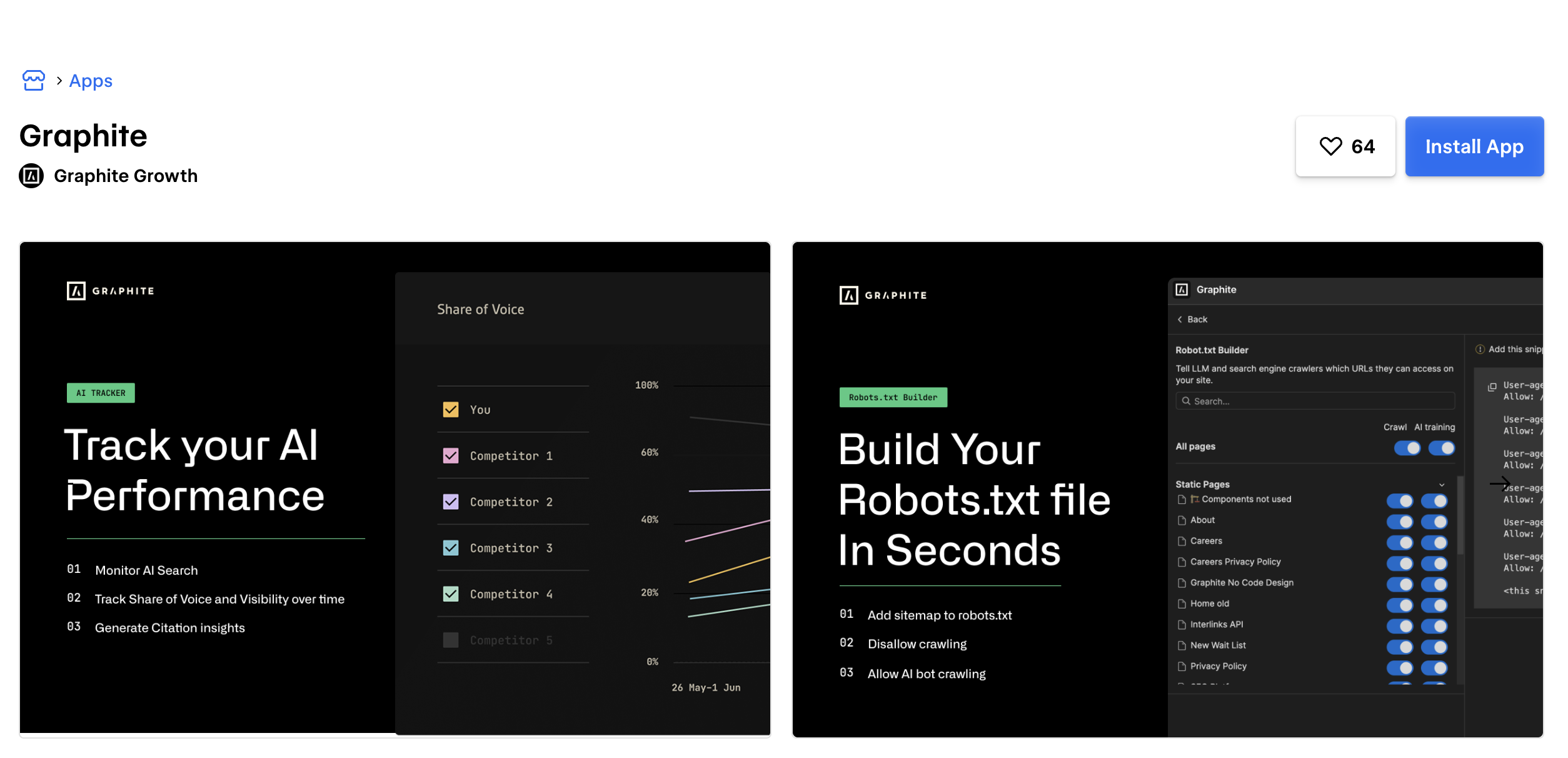
The app covers five capabilities once installed:
- Meta editor: Update title tags, meta descriptions, OG images, and search settings across all pages from a single view without opening each page's settings individually.
- Robots.txt builder: Configure which pages and folders Google bot and OpenAI can crawl. Optimize your crawl budget and make your sitemap easier to find.
- Schema markup builder: Select a static or CMS page, pick a schema type, fill out the form, and copy the generated markup. The builder handles both static and Webflow CMS collection pages.
- AI access configuration: Control what level of access LLMs have to your content like training, indexation, or full access on a per-page basis.
- AI tracker: Track your share of voice and visibility across ChatGPT, Perplexity, AI Overviews, Claude, and Gemini. See how you rank against competitors and access raw answer data per engine.
The app requires read/write access to site data, CMS data, page data, and authorized user information. Install it from within Webflow's Apps panel, authenticate with your Graphite account, and the interface loads directly in the panel.
Apply on-page recommendations in Webflow
Once the Graphite app covers your technical metadata layer, the next step is applying on-page recommendations from Graphite's strategy work directly in Webflow. This applies to both static pages and CMS-driven content.
A typical workflow looks like this:
- Identify priority pages (landing pages, blog collection items, feature and use-case pages) and define target outcomes: non-brand organic traffic, conversions, LLM referrals.
- Structure your Webflow CMS collections with fields that support SEO execution: meta title, meta description, primary topic, and internal link targets. Note: Webflow CMS collections support up to 60 custom fields per collection.
- Apply on-page changes — update H1/H2 heading structure, intro copy, internal linking, and FAQ sections based on Graphite's recommendations.
- Confirm technical settings: check crawlability and indexing, verify templates output consistent heading structure, and configure redirects and canonicals after URL changes. Setting per-item canonical URLs in CMS collections requires adding a custom CMS field for the canonical URL and injecting it via a custom code snippet in the collection template's
<head>tag. - Publish and measure — keep a changelog to attribute performance shifts to specific releases, and review search performance with external tools like Google Analytics and Search Console, since Webflow does not include built-in analytics.
An operational checklist for each page before publishing: a clear primary topic and intent, a single descriptive H1, logical H2/H3 sections, an updated meta title and description, purposeful internal links, and a finalized URL with a redirect plan if the URL changes.
Apply changes at scale with CMS templates
For CMS-driven sites, many SEO improvements are template-level changes that propagate across an entire collection without editing items individually.
Template-level changes cover: standardizing title and meta patterns per collection, ensuring consistent placement of intro copy and FAQ modules, and adding related content modules for internal linking using reference fields or Collection Lists. Internal linking apps from the Webflow Marketplace — such as AutoLink AI or LinkerFlow — can also automate link placement across CMS content.
Template changes are the right approach when the same structural issue affects dozens or hundreds of pages. An individual schema update or heading tweak can wait for item-level editing; a missing FAQ module on every blog post needs a template fix.
Build with the Webflow CMS API
For teams managing large volumes of content programmatically, the Webflow CMS API enables creating, updating, and publishing collection items at scale — informed by Graphite's content strategy. This path requires a developer and an API token with cms:write scope.
The relevant v2 endpoints:
- List collection items:
GET /v2/collections/{collection_id}/items— audit existing content, check current metadata, or pull items for bulk review. - Create collection items:
POST /v2/collections/{collection_id}/items— publish new pages at scale. Bulk creation supports up to 100 items per request. - Update collection items:
PATCH /v2/collections/{collection_id}/items/{item_id}— apply SEO improvements programmatically to existing items. Bulk update also supports up to 100 items per request.
Webflow webhooks complement this workflow. When a collection item is created or updated, the collection_item_created and collection_item_changed events fire and can route data to external systems — a search index like Algolia, an analytics pipeline, or an external database — without manual intervention.
API-based workflows are the right choice when content volume makes the Webflow UI impractical, or when you need to sync Webflow content state with another system. For most marketing teams, the app and template-level methods cover the majority of Graphite's recommendations without any custom code.
What you can build with the Graphite Webflow integration
Integrating Graphite with Webflow gives marketing and growth teams a repeatable system for implementing SEO and AEO strategy — from fixing metadata in bulk to building content that earns citations in AI-generated answers. The range of builds scales with how much of the integration you use.
Here are a few things you can build:
- SEO-optimized marketing pages: Update high-intent landing pages with clearer above-the-fold copy, stronger topical coverage, and structured internal linking using Webflow's page settings and CMS templates — applying changes informed by Graphite's content strategy.
- AEO-ready content hubs: Create structured content with question-based headers, optimized intro copy, and FAQ sections that answer user questions directly, making pages more likely to appear in AI-generated results. Graphite's work with Webflow resulted in a documented 2x increase in signups from LLMs.
- CMS-driven content operations: Maintain a consistent publishing cadence with standardized metadata and template structure across Webflow CMS collections. Template-level changes apply SEO improvements across dozens or hundreds of pages at once, reducing manual overhead.
- Iterative growth workflow: Tie each publish cycle to measurable outcomes — traffic, signups, engagement — using Google Analytics and Search Console, then use Graphite's AI tracker to monitor share of voice in LLM answers and prioritize the next set of updates.
To get started, install the Graphite app from the Webflow Apps Marketplace. For API-based workflows, see the Webflow CMS API documentation for authentication setup and endpoint reference.
Frequently asked questions
Yes. The Graphite app is available on the Webflow Apps Marketplace and includes a free plan. It covers bulk metadata editing, robots.txt configuration, schema markup generation, AI LLM access controls, and AI visibility tracking across ChatGPT, Perplexity, AI Overviews, Claude, and Gemini. The agency side of Graphite operates separately as a service engagement.
Webflow automatically generates canonical tags for static pages. For CMS collection items, setting per-item canonical URLs requires adding a custom CMS field for the canonical URL value, then injecting it as a
<link rel="canonical">tag using a custom code snippet in the collection template's<head>tag. This is a moderately technical change and is well-documented in Webflow's developer resources.Webflow does not include built-in analytics beyond form submission tracking. Connect Google Analytics and Google Search Console to track organic traffic, conversions, and UTM attribution. Keep a changelog of content updates in Webflow so you can attribute performance shifts to specific publish cycles. For AI-driven traffic, the Graphite app's AI tracker monitors share of voice and LLM citation data across major answer engines.
Yes, through two routes. Template-level changes in Webflow propagate structural updates, heading patterns, metadata formats, and FAQ modules across all items in a collection without editing each one individually. For programmatic updates, the Webflow CMS API supports bulk creation and update of up to 100 collection items per request, with
cms:writescope required on your API token.AEO (answer engine optimization) focuses on making content more likely to be cited in AI-generated answers from tools like ChatGPT, Perplexity, and Google's AI Overviews. For Webflow sites, the implementation overlaps heavily with SEO: structured content with clear question-and-answer patterns, strong topical coverage, and well-optimized above-the-fold copy all contribute to both. The main difference is measurement — AEO tracks share of voice in LLM answers rather than keyword rankings. The Graphite app's AI tracker handles this directly within Webflow. Graphite's documented work with Webflow's own site provides a concrete example: see the Graphite and Webflow case study for specifics on the AEO strategies used.
Description
Install the Graphite Webflow app to bulk-edit metadata, build schema markup, and track AI visibility. For CMS-driven sites, apply changes at the template level or use the Webflow CMS API to update collection items programmatically based on Graphite's strategy.
This integration page is provided for informational and convenience purposes only.

Gemini
Connect Google Gemini to Webflow to add AI text generation, image analysis, and automated content pipelines to your site.
Algolia
Connect Algolia with Webflow to add real-time search, faceted filtering, and content discovery to CMS-driven sites.
Datadog
Connect Datadog with Webflow to monitor real user performance, track frontend errors, and run synthetic uptime checks on your published site.
Braintrust
Connect Braintrust with Webflow to monitor AI-powered features on your site and sync evaluation data into your CMS.
Sentry
Connect Sentry with Webflow to monitor JavaScript errors, track performance, and replay user sessions on your published site.
SchemaRabbit
Connect SchemaRabbit with Webflow to generate and maintain JSON-LD schema markup across your site using the official Webflow app or manual code implementation.
Linknavigator
Connect Linknavigator with Webflow to automate internal linking, monitor link health, and improve SEO across content-heavy sites.
PixelFlow
Connect PixelFlow to Webflow for sending conversion data directly through PixelFlow's servers to Meta.
Schema Flow
Connect Schema Flow with Webflow to add structured data markup across your site using a no-code interface with AI suggestions and CMS collection mapping.
Related integrations
Get started for free
Try Webflow for as long as you like with our free Starter plan. Purchase a paid Site plan to publish, host, and unlock additional features.
