






Enhancement
Edit Mode
Edit content in interactive elements
You can now edit content inside interactive elements like nav bars, dropdowns, tabs, and sliders. This makes it easier for Marketers and Content editors to manage interactive content.
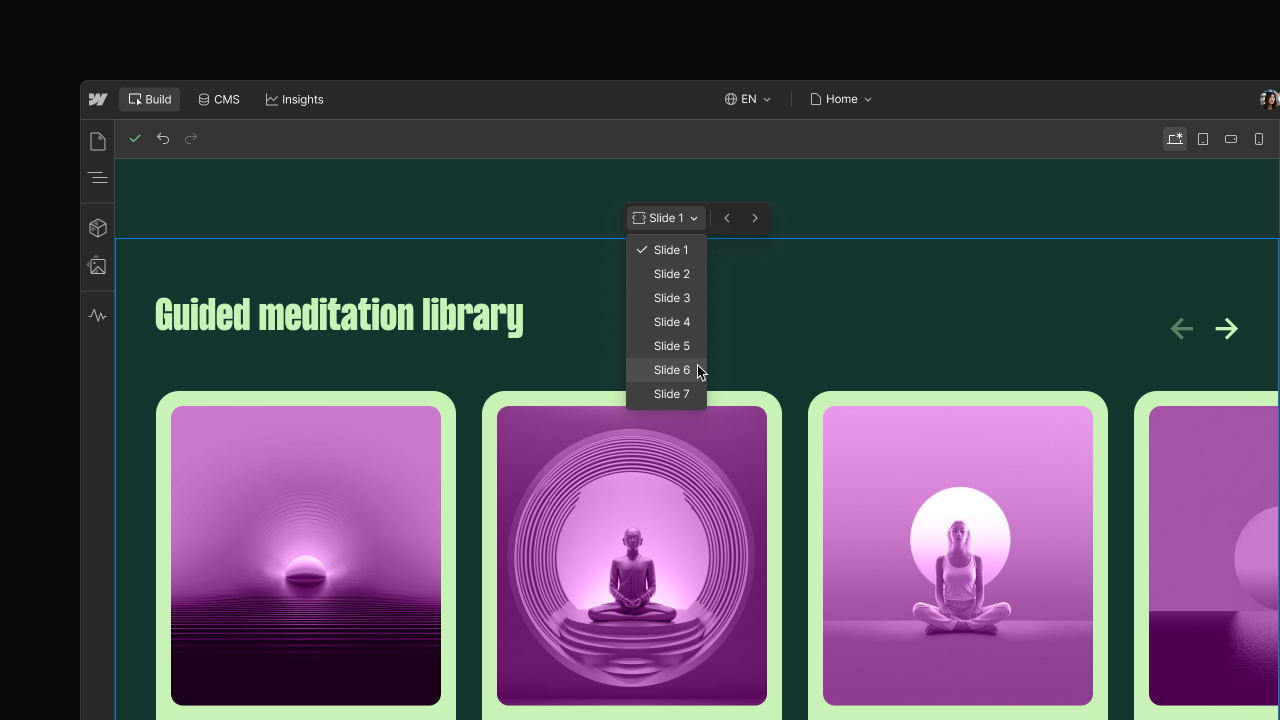
Keeping interactive content up to date shouldn’t require switching roles or asking a designer or developer for help. With this update, Marketers and Content editors can now edit content inside interactive elements directly in the canvas.
You can update text and content within supported elements like Webflow’s native nav bar, dropdown, tab, and slider — even when parts of those elements are hidden by default. This makes it easier to manage real-world site content that lives inside interactive patterns.
What’s included
- Edit content inside nav bars, dropdowns, tabs, and sliders
- Expose hidden menu items, tabs, or slides directly in the canvas
If an interactive element lives inside a component and its content isn’t bound, editing that content isn’t supported yet. Support for editing unbound content in components is coming soon.
This update helps marketers and content editors move faster while reducing dependencies on Designers for everyday content changes.
To learn more about other recent updates to content editing in Webflow, checkout our other recent release post.
Related updates






















Fangen Sie kostenlos an
Testen Sie Webflow so lange Sie möchten mit unserem kostenlosen Starter-Paket. Erwerben Sie einen kostenpflichtigen Site-Tarif, um zusätzliche Funktionen zu veröffentlichen, zu hosten und freizuschalten.
Testen Sie Webflow so lange Sie möchten mit unserem kostenlosen Starter-Paket. Erwerben Sie einen kostenpflichtigen Site-Tarif, um zusätzliche Funktionen zu veröffentlichen, zu hosten und freizuschalten.