






Enhancement
Developer
Redesigned code editors with Emmet and auto-complete
Webflow's code editors now share one unified experience with search and replace, Emmet expansion, and inline auto-complete for styles and variables.
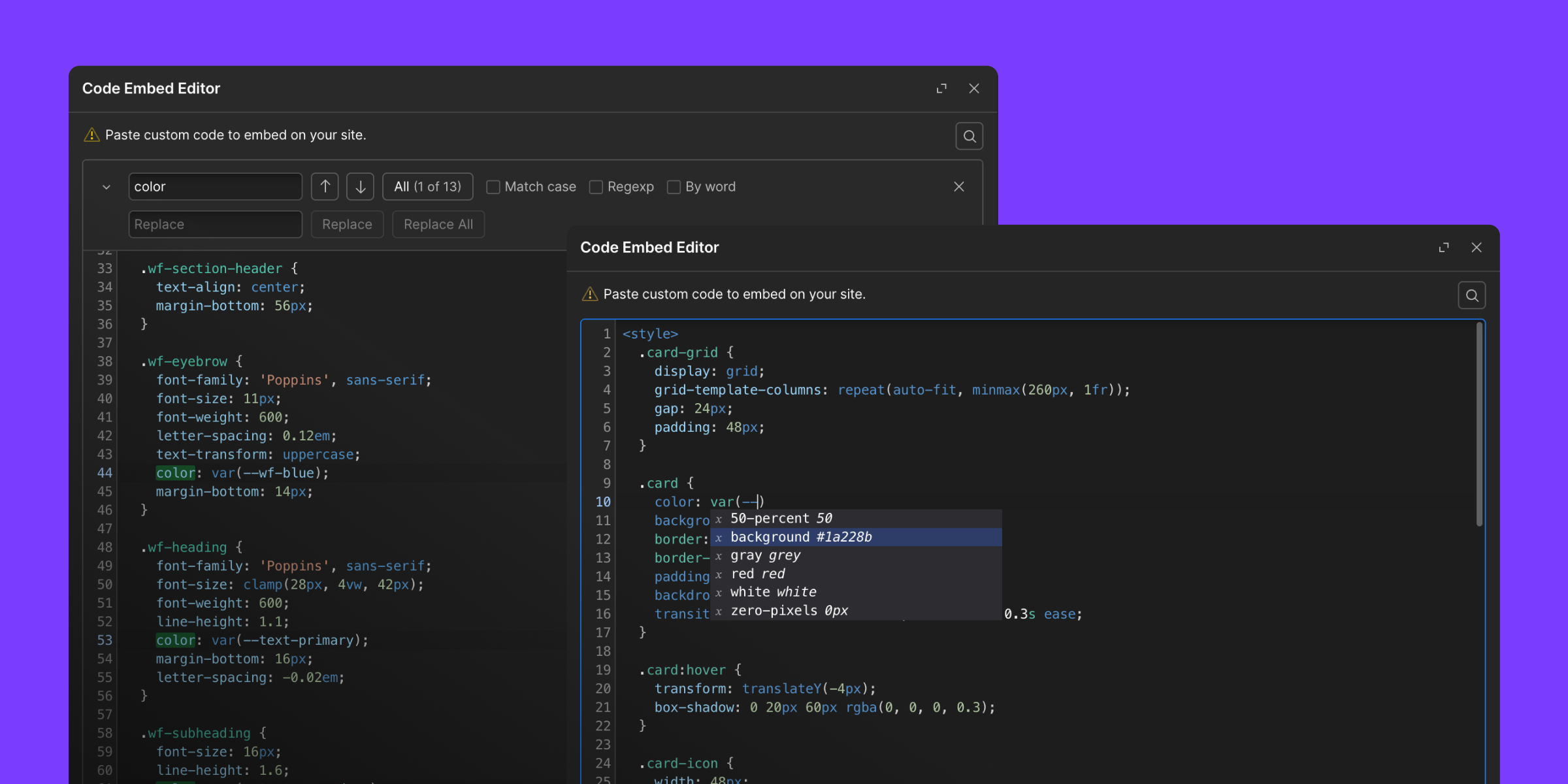
Webflow's code editors have been redesigned around a single, unified editing experience. Every code surface (Code Block, Code Embed, Page Settings custom code, and Dashboard custom code) now shares the same editor with search and replace, Emmet abbreviation expansion, inline auto-complete for styles and variables, and a VS Code-inspired color scheme.
Unified editing experience
All four code surfaces now share the same modern editor with a consistent set of capabilities.
- Find and replace text across all code areas via a new search button or
Cmd-F / Ctrl-F - Code Block and Code Embed now open in resizable, draggable modals instead of a fixed-size panel
- The editor auto-completes HTML tags and closes brackets as you type
- Updated VS Code-inspired color scheme for improved readability
- One-click formatting via Prettier with HTML, CSS, and JS validation to catch errors before publishing
- Warnings when approaching the 50K character limit
- Unsaved change detection before navigating away
Emmet abbreviation support
The code editors now support Emmet abbreviations, letting you type shorthand like ul>li*5 or div.container and expand it into full HTML with Tab.
- Works in Code Embed, Page Settings, and Dashboard custom code for HTML and for CSS in
<style>tags - On Code Block, Emmet shortcuts also work for CSS, HTML, and JSX/TSX depending on the language selected
- Expansion behavior matches VS Code and other modern editors
Styles and variables auto-complete
The code editors now offer inline auto-complete for your site's styles and variables as you write custom code.
- As you type, Webflow suggests matching class names and variables so you don't need to memorize or look them up
- Available in Code Block, Code Embed, Page Settings custom code, and Dashboard custom code
- Teams maintaining complex sites no longer need to switch between the style panel and code editors to verify class names or variable values
Related updates




















Get started for free
Try Webflow for as long as you like with our free Starter plan. Purchase a paid Site plan to publish, host, and unlock additional features.
Try Webflow for as long as you like with our free Starter plan. Purchase a paid Site plan to publish, host, and unlock additional features.