




What developers miss when they assume “free” means low cost
Open source has always represented flexibility. You can self-host, customize every part of your stack, and build on your own terms. But the same flexibility that feels empowering at first is what eventually slows teams down.
The core architecture of open-source CMSs like WordPress and Drupal is stable, but complexity creeps in when you start extending them. The plugin ecosystem adds power but also risk: updates that break compatibility, dependencies that stack up, and performance that depends on dozens of third-party maintainers keeping pace.
That’s when “free” starts to look a lot like unpaid maintenance work. This is what’s often called a traditional CMS, like WordPress or Drupal, where developers have to stitch together plugins, servers, and templates.
Read more about the next-gen Webflow CMS here.
The myth of “free”
Open source doesn’t remove cost. It just changes how you pay.
Running WordPress yourself means you own everything that happens between your local environment and production. Hosting, caching, CI/CD, backups, and patching all fall to your team.
Open source gives you the raw materials of a web platform, not a finished system. It’s a website in a box with assembly required.
In the beginning, that feels manageable. You avoid licensing fees and keep total control. But as the system grows, so do the moving parts. Each plugin adds another update cycle to test. Each server or service adds another integration to maintain.
You don’t pay for it upfront, but it still takes constant care to keep alive. The cost isn’t dollars. It’s time. And that raises a bigger question. How much is that time worth? It’s time that could be spent building new client projects, improving systems, or working on higher-impact problems instead of maintaining a CMS.
The true cost of open source
The true cost of open source isn’t the license fee, it’s everything you have to build, maintain, and secure around that “free” software to make it production-ready.
Here’s the real breakdown, especially in the context of web platforms like WordPress, Drupal, or other open-source CMSs:
1. Engineering time is the real currency
Even with strong processes in place like staging, CI/CD, and QA, maintenance still takes time. Every update, dependency, or plugin adds another task your team has to manage and test.
For smaller teams or agencies, that work is often manual. For larger teams, it shows up as developer hours spent reviewing pull requests, patching security issues, or validating plugin updates before deploys. The cost is the same either way.
- Plugin updates and version conflicts are a common source of site breaks.
- Theme changes can ripple through templates and layouts.
- Manual testing replaces vendor QA and regression coverage.
It’s necessary work, but it rarely moves the product forward. Here’s what that looks like in practice.
Let's say a marketing site runs on WordPress with:
- 25 plugins for SEO, forms, caching, localization, and more
- A custom theme
- A managed host like WP Engine
Each of those adds cost on top of developer time. Plugins and themes often require paid licenses. Managed hosting isn't free, and every update or issue still needs developer attention.
Each month:
- 6 to 10 plugins release updates
- One of those updates breaks a layout due to a CSS conflict.
- The developer rolls back the update, tests the staging site, and refactors the theme to stay compatible.
- 2 hours go to testing, another 2 to debugging, plus 1 to deploy and verify
Even at a conservative $100 per hour internal cost, that’s $500 per month in maintenance for one incident. Multiply that by dozens of sites or clients, and the “free CMS” costs thousands per year in developer time just to stand still.
If your team isn’t handling this in-house, you’re paying for it another way. Agencies and managed hosts charge for the same maintenance work behind the scenes. And if you’re the agency, that’s time you could spend on more fulfilling client work instead of late-night messages about broken sites.
2. Infrastructure load
You own the entire stack.
- Hosting
- CDN
- SSL certificates
- Backup systems
- Caching layers
Each piece needs setup, monitoring, and long-term upkeep. Even with good tooling, there is still overhead. Servers need patching, certificates need renewing, and performance needs to stay consistent across environments.
Teams with a CI/CD pipeline might automate some of this work, but automation still takes engineering time to build and maintain. For smaller teams, it is often manual. Either way, the responsibility sits with developers, not the platform.
3. Security liability
Open source means an open attack surface.
- WordPress alone sees tens of thousands of plugin vulnerabilities every year.
- Each dependency needs monitoring, patching, and risk assessment.
- Hotfixes and firewalls require manual setup or paid services.
The tradeoff is simple: control versus accountability. You control your stack, but you also own every breach.
Webflow approaches this differently, security, hosting, and updates are managed at the platform level, removing a major source of developer overhead.
Unlike the open-source plugin model, Webflow’s Marketplace apps are fully vetted and run in a secure sandboxed environment, keeping your core site stable even when apps update. And because features like SEO, backups, and performance optimization are built directly into the platform, there’s less need to rely on third-party plugins to fill critical gaps.
4. Performance and technical debt
Open-source CMSs tend to layer code on top of code. Over time, that adds up.
- Slow load times impact Core Web Vitals.
- Plugins load render-blocking scripts.
- Inconsistent markup affects accessibility and SEO/AEO.
The result is time lost chasing performance regressions and debugging issues caused by third-party code.
Webflow’s output is clean, semantic HTML, CSS, and JS by default, so developers can focus on optimizing what matters, not cleaning up what shouldn’t have been there in the first place.
5. Team drag
The cost isn’t just technical. It’s operational.
- Marketers rely on developers for small site updates.
- Developers get pulled into support and maintenance.
- Designers can’t iterate because every change requires a deploy.
Each of these slows down the entire team. With Webflow, that dependency loop breaks, marketing can publish safely, designers can adjust layouts visually, and developers can focus on higher-leverage work.
Templates might keep things safe, but they also keep teams static. Once every change needs developer time, creative progress slows to a crawl.
Webflow removes that friction. Marketers can publish safely and update content directly on the page. Designers can build and adjust layouts visually without waiting on a dev cycle. Developers can set the structure, define components, and focus on integrations and performance instead of fixes.
6. Managed hosting doesn’t eliminate the problem
WordPress VIP/Acquia aren’t open source. They’re commercial managed services built on top of it, with the same reliance on rigid themes and templates that limit design flexibility. That managed layer reduces infrastructure work, but inherits the same plugin-based architecture underneath.
Managed offerings like WordPress VIP, Acquia and WP Engine mitigate some of the pain by handling hosting, uptime, and support, but the same architectural dependencies remain.
- The plugin model remains.
- Update cycles continue.
- You’re paying enterprise prices for a managed version of the same complexity.
It reduces surface risk but not system complexity. Webflow starts from a different architecture, fully managed, scalable, and extensible through APIs and the CLI, without dragging along the technical debt.
7. Enterprise readiness and scalability
Open source CMSs don’t scale through automation, they scale through people, more engineers, more maintenance, more risk. Webflow scales through infrastructure.
Enterprise teams get advanced governance, SSO, audit logs, and granular permissions built in. Global CDN delivery and 99.99% uptime SLAs mean marketing, design, and engineering can all move faster without creating separate systems to manage.
For teams balancing localization, compliance, and global publishing needs, that predictability isn’t just convenient. It’s critical.
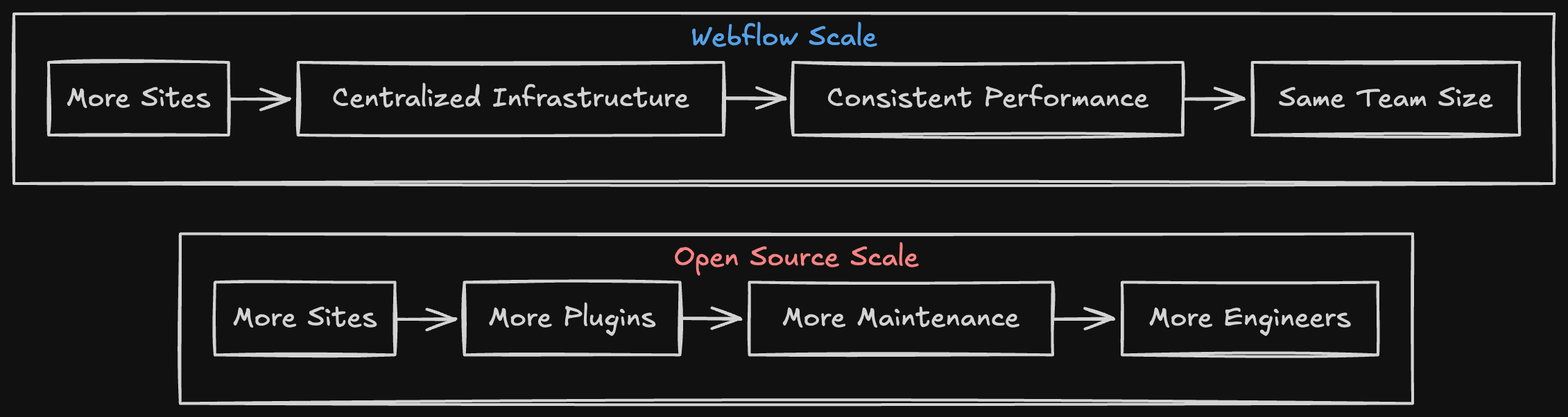
8. The real equation
Open source looks inexpensive, but the true cost lives in the gaps, the hours, the integrations, the upkeep, and the risk that come from owning the full stack yourself.
A better way to build for the modern web
Webflow isn’t a closed system. Developers can build Apps, deploy server-side logic with Webflow Cloud, connect data through the Data API, and use Code Components to bring React elements directly into the visual canvas.
Its architecture is composable by design. Developers can connect data, components, and integrations in one environment instead of managing a patchwork of plugins and services. They can also write custom code directly into any page and see or export the semantic HTML, CSS, and JavaScript Webflow generates. It gives them full visibility into the front end, so extending or building on top of it feels natural.
This approach gives developers the same control they expect from modern frameworks, without having to maintain the infrastructure, plugins, or third-party dependencies that slow teams down.

Developer control without developer debt
Developers don’t need to trade control for convenience. They just need systems that are built to scale with them instead of against them.
Webflow gives developers real control without the weight of maintaining it. With APIs, CLI tools, Code Components, and Webflow Cloud, developers can integrate, automate, and deploy with the same precision they expect from any modern framework, only faster, cleaner, and more predictable.
That’s what control looks like when it’s built for today’s web, not yesterday’s.
How developers are using Webflow today
- Building full-stack apps and dynamic experiences with Webflow Cloud
- Connecting structured data through the Data API
- Publishing and reusing UI systems through Code Components
- Automating workflows and deploys with the CLI
- Extending functionality through Apps and the Marketplace
- Writing custom code that can be injected anywhere on a page
- Viewing and exporting the semantic HTML, CSS, and JS Webflow generates to build on top of it
- Manage content programmatically with CMS APIs
- Serve published content at scale through cached, read-optimized Delivery APIs
These aren’t workarounds. They’re how developers are already using Webflow as a production-grade platform that scales from startup to enterprise.
Closing
Engineering time is one of the most expensive line items in any organization. When developers spend it maintaining systems instead of building new ones, the entire company slows down.
Open source gives developers flexibility, but it also hands them the responsibility to maintain it forever. For some, that tradeoff is worth it. For most, it’s not.
WordPress VIP and Acquia try to manage that complexity, but it still carries the same architecture and overhead.
Webflow consolidates infrastructure, design, and content management into a single platform. Developers get the flexibility to extend and integrate, backed by the reliability of a managed system. Marketing and design can move independently, while developers stay focused on innovation. The result is faster iteration, lower operational cost, and higher throughput across every team.
True freedom isn’t maintaining every part of your stack. It’s knowing you don’t have to.
If you enjoyed this post you can check out the articles below or visit Webflow vs. WordPress and Webflow for developers.