






Feature
Website management
Control who can work on individual pages with page-specific access control
Limit who can edit individual pages so teams can collaborate with confidence — without exposing the rest of your site. Available for Webflow Enterprise customers and their Partners.
.jpg)
Today, we’re introducing page-specific access control — allowing you to specify which pages teammates can work on, so they can contribute to the pages they own without gaining access to the rest of your site. Available for Webflow Enterprise customers and their Partners.
How it works and why it matters
A few months ago, we released CMS Collection access control to give Enterprise teams the ability to restrict who can edit specific CMS Collections – like limiting the Content team to only edit the Blog, the HR team to only work on Job Listings, etc. Today, we’re expanding those granular controls to restrict user access to individual pages.
With page-specific access control, Admins can choose exactly which pages a teammate can work on. For example, you can restrict:
- Only certain teammates to work on the Home page
- Legal team to the Terms & Conditions page
- Monetization team to the Pricing page
- And the list goes on…
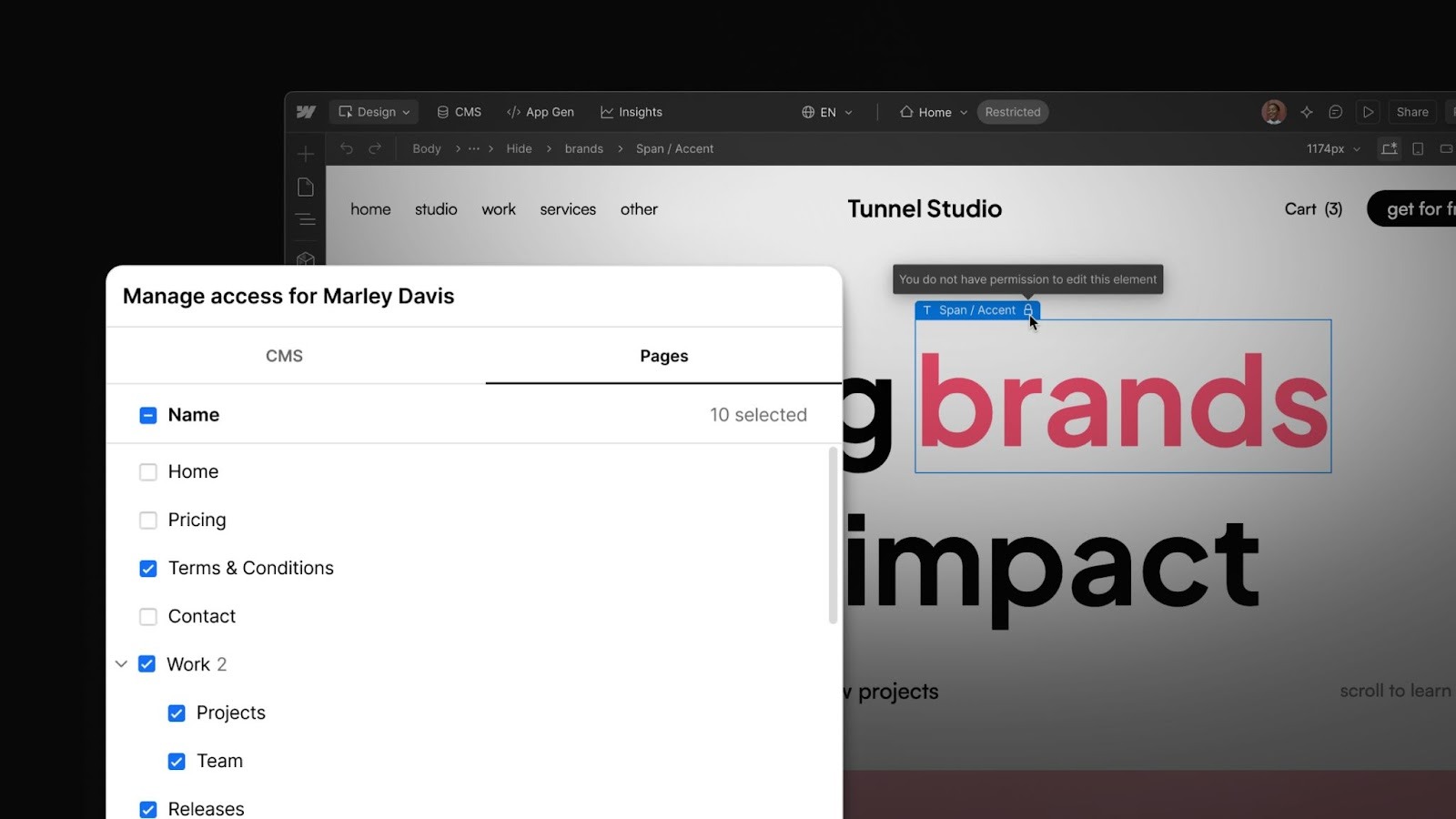
This adds another layer over governance when it comes to user access across your site, allowing you to confidently invite more collaborators, reduce the risk of accidental edits, and assign clear ownership over the different pages across your site.
As an Admin, I now have confidence that my team only has access to sections of the site that apply to them — and peace of mind knowing changes are happening only where they should.
- Josephine Cahill, Web Lead @ Oyster HR
What’s next
We’re not done adding controls and guardrails that allow large teams to build, manage, and optimize their sites faster and safer. Next, we’re working on locale-specific access control so you can specify which locales certain teammates can access and which they can’t (e.g. the Spanish-speaking team can work on the Spanish locale, but can’t edit the French or German locales).
We’re thrilled to continue empowering teams to scale on Webflow with speed and safety, together. For more on how today’s page-specific access control works, check out our documentation. If you’d like to speak to someone about getting access to this capability on Webflow Enterprise, get in touch with our sales team.
Related updates
.png)
.jpg)





















Get started for free
Try Webflow for as long as you like with our free Starter plan. Purchase a paid Site plan to publish, host, and unlock additional features.
Try Webflow for as long as you like with our free Starter plan. Purchase a paid Site plan to publish, host, and unlock additional features.