




Prompting can get something on screen fast. Shipping it in production takes structure, ownership, and systems teams can trust.
So where does visual development fit in a production stack? Developers usually don’t ask this question because they’re curious. They ask it because something burned them.
In most cases, that burn came from a visual tool that looked fast in a demo and fell apart under use. Layouts that didn’t survive content. UI that was close enough to look finished but still wrong in ways that mattered. Platforms that promised speed and quietly shifted the cost of correctness back onto engineering.
So when someone asks where visual development fits in a production stack, they’re not asking for a philosophy of tools. They’re trying to avoid inheriting another system they’ll have to clean up later. That’s why the question tends to be simpler than it sounds: what happens after the prompt?
Prompting gets you running. Shipping is everything else.
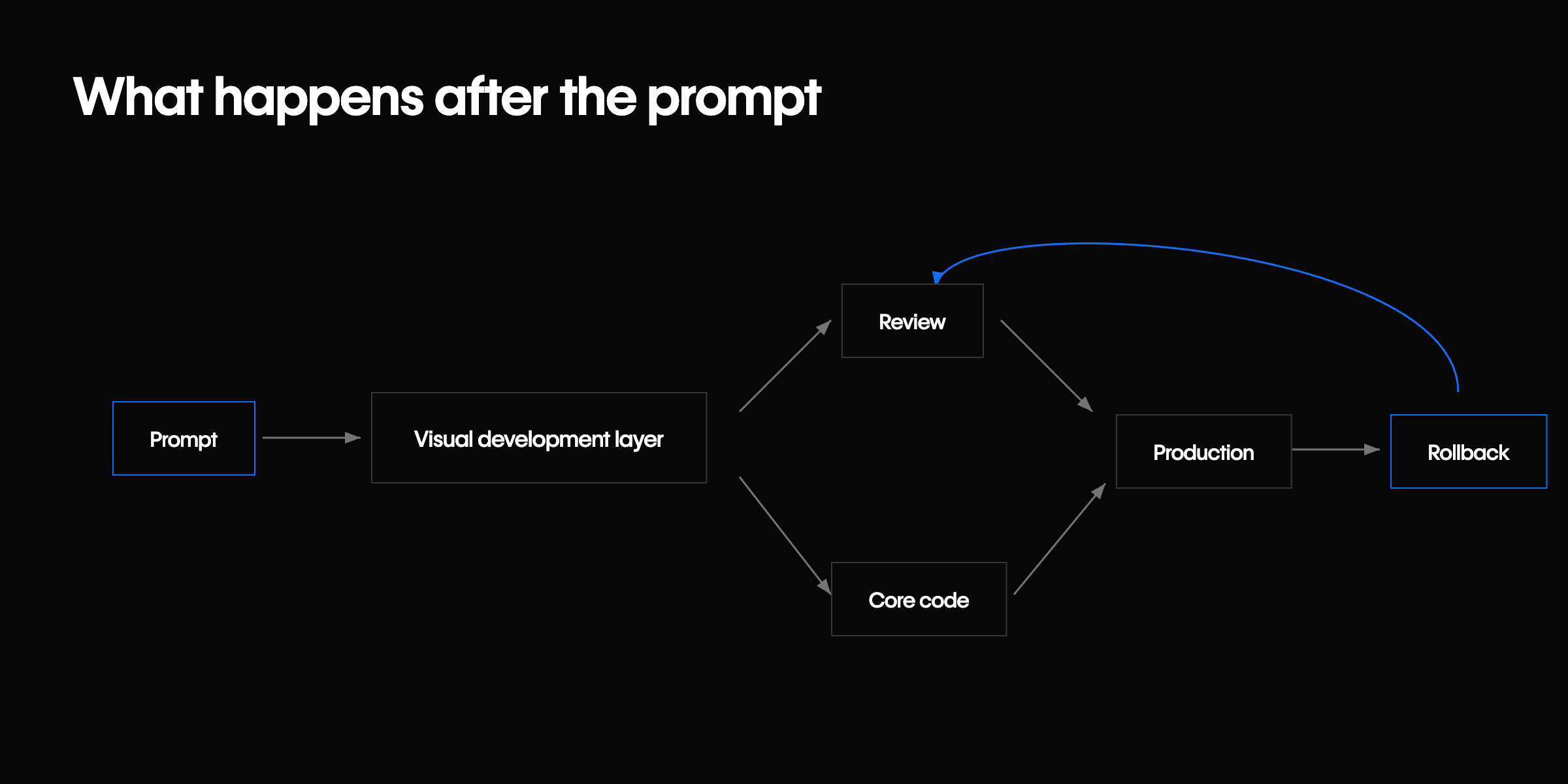
Prompting is good at generating momentum. It gets something on screen quickly and gives teams a starting point they can react to. That alone is useful, especially early in a project or when you’re trying to explore an idea without overcommitting.
What prompting doesn’t handle is the work that actually determines whether something ships. That work starts after the first version exists, when details begin to matter and the happy path breaks down. In practice, that’s things like:
- Getting spacing and layout right across breakpoints
- Enforcing consistency across reused components
- Handling edge cases the prompt never anticipated
- Changing things without breaking someone else's work
- Figuring out ownership when something breaks
That’s the gap between “this looks good” and “this is production-ready.” Most tools optimize for the first moment. Fewer support the handoff from draft to production.
None of this is an argument against AI or vibe coding. I use these tools constantly, and they’re improving fast. Prompting is an effective way to explore ideas, scaffold systems, and move past blank states. Some products are already treating AI output as something that needs structure, refinement, and integration into a broader system — not as a finished artifact.
As vibe coding tools move from generating output to making changes directly in systems, the scope of what can go wrong grows with it. Agents that can update content, run experiments, and deploy changes without a human in the loop are already here. That's not a future state. Once something can act, not just generate, questions of review, rollback, and ownership matter more. The problem isn't generation. It's assuming generation is where the work ends.
What a production stack actually optimizes for
When developers talk about a production stack, they’re usually not talking about which framework they picked or how modern the syntax looks. They’re talking about trust.
A production stack is built to protect things over time, not just get something out the door once. Teams care about predictable output even as requirements change, clear ownership when multiple roles are involved, collaboration that doesn’t require constant policing, and deploys they can undo without panic.
Speed still matters, but only when it compounds. If velocity today creates cleanup work tomorrow, that speed isn’t real, it’s borrowed. This is why skepticism toward visual tools is often earned. It’s not about aesthetics or purity. It’s about whether the system holds up once people start using it.
The work developers shouldn’t be doing anymore
At the same time, a lot of developer time today is spent on work that shouldn’t require engineering attention in the first place.
Developers get pulled into things like:
- Marketing page updates
- CMS content tweaks
- Layout fixes
- Localization changes
- Experiments that keep shifting requirements
All of that work matters to the business, but it isn't where developer time matters most. When every one of those changes requires a pull request, review, and deploy, the stack is misaligned. Engineering becomes the choke point not because developers want control, but because the system gives them no safe way to hand it off.
That tension usually shows up as frustration, not a clean architectural problem.
Where visual development actually belongs
This is where visual development can make sense, but only when it’s used intentionally.
Visual tools earn their place when they own parts of the stack that change frequently and benefit from being visible. The kinds of work where precision matters more than abstraction, and where collaboration across roles is unavoidable.
In practice, that usually includes things like:
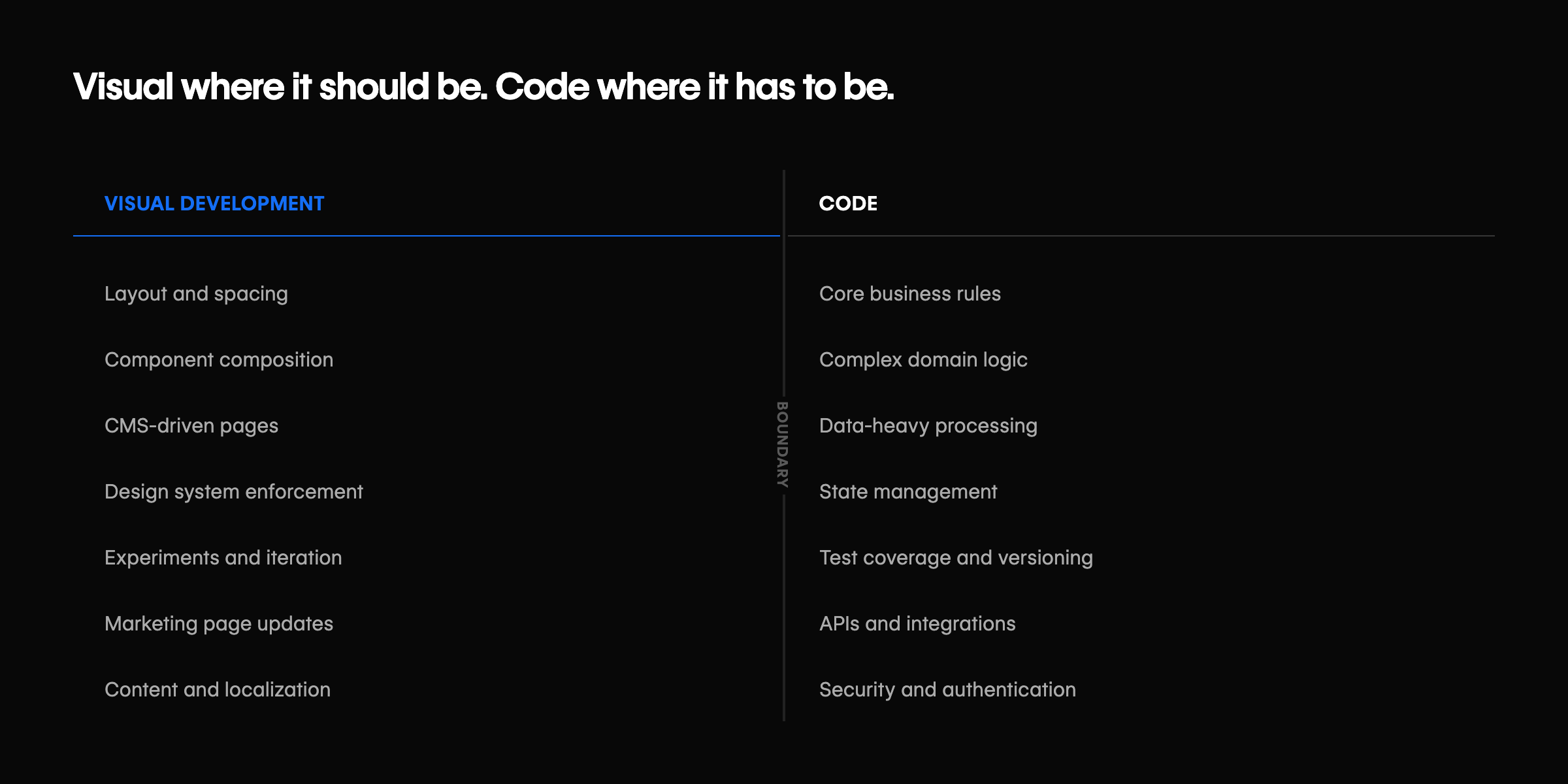
- Layout and spacing
- Component composition
- CMS-driven pages
- Enforcing a design system
- Experiments and iteration
Used this way, visual development isn’t a shortcut. It’s a boundary. Developers define the structure and constraints, and designers and marketers operate inside those constraints. Changes happen where they should, without leaking into places they shouldn’t. That’s not cutting developers out; it’s removing unnecessary dependency on them.
Where visual development should not be used
The boundaries still matter, even as more of the stack becomes visual.
There’s a push in the industry to represent more complex logic visually. Workflow builders, low-code platforms, and AI-driven tools are all trying to make business rules, data flows, and state transitions easier to reason about at a glance. For many teams, that’s genuinely helpful, especially when it improves understanding and collaboration.
The tension shows up when visual systems move from representing logic to owning it. Core business rules, complex domain logic, data-heavy processing, and anything that needs deep test coverage or strict versioning still benefit from being explicit. These are the parts of a system where teams want diffs they can inspect, tests they can trust, and changes they can reason about with confidence.
When a platform claims it can handle all of that visually, skepticism is warranted. Production stacks draw boundaries on purpose not to limit who can contribute, but to make sure responsibility, testing, and long-term maintenance stay clear as systems grow.
The “now what?” problem
Most generation-focused tools fall down after the first version exists.
Once something is on screen, the questions start showing up:
- Who refines this?
- Who owns the final pixels?
- How do changes get reviewed?
- How do you prevent regressions?
- How do multiple people work on it safely?
This is where collaboration either becomes smooth or chaotic. The difference is whether there’s a shared system for refinement and review.
The visual layer absorbs most iteration. Engineering steps in when logic or structure needs to change.
Prompting doesn’t answer those questions. It can’t. They’re about process, not output. This is the moment where visual systems either prove their value or quietly become liabilities.
Visual development as a refinement layer, not a shortcut
The strongest visual tools don’t try to replace generation. They absorb it.
They give teams a place to turn rough output into something stable. A shared surface where structure is visible, constraints are enforced, and changes are understandable. A way to refine and iterate without starting over every time something needs to be exact.
Developers still guide the system. They just don’t have to personally push every pixel or approve every minor change. That’s the difference between speed that looks good in a demo and speed that holds up in production.
What developers should demand from visual tools
Before trusting a visual layer in a production stack, developers should expect some non-negotiables:
- Clean, inspectable output
- APIs and extension points
- Predictable deploys
- A clear rollback story
- Clear visibility into changes and versions
- The ability to lock down unsafe changes
If a tool can’t meet those expectations, it doesn’t belong in production. No amount of demo speed makes up for that.
The tradeoff
This isn’t a debate about visual versus code. It’s a decision about ownership.
Either developers own every change forever, or they design systems that let other people move safely without creating downstream problems. Most production stacks eventually choose the second option, whether they say it out loud or not, because the first doesn’t scale once teams, workflows, and surface area grow.
This is where platforms like Webflow tend to show up. Not as a replacement for code, but as a way to formalize that boundary. Developers define structure, constraints, and extension points. Designers and marketers work inside a visual system that’s built to respect those decisions. Changes happen without pulling engineers into every layout tweak or content update, and when engineering does need to step in, they’re working on the system, not cleaning up after it.
Prompting fits into this the same way. It’s useful for getting started, but it doesn’t solve ownership, collaboration, or long-term maintenance. Debugging, refinement, and shared workflows are what turn something into a shippable system. Webflow works when it supports that reality: visual where it should be, code where it has to be, and clear lines between the two.
That’s the tradeoff teams are actually making. Not visual versus code, but who owns what, and how safely work can move once the system is in place.