






Enhancement
Designer
Protect your site with improved publishing workflows
Improved staging and publishing workflows that provide more visibility and tighter control over how changes go live to your production website.

To give you more control over how changes are pushed to your live site, we’re introducing a new publishing workflow for Enterprise customers that gives you both a prepublish summary of all proposed changes and the ability to publish directly from your staging domain to your production domain. Here’s how it works:
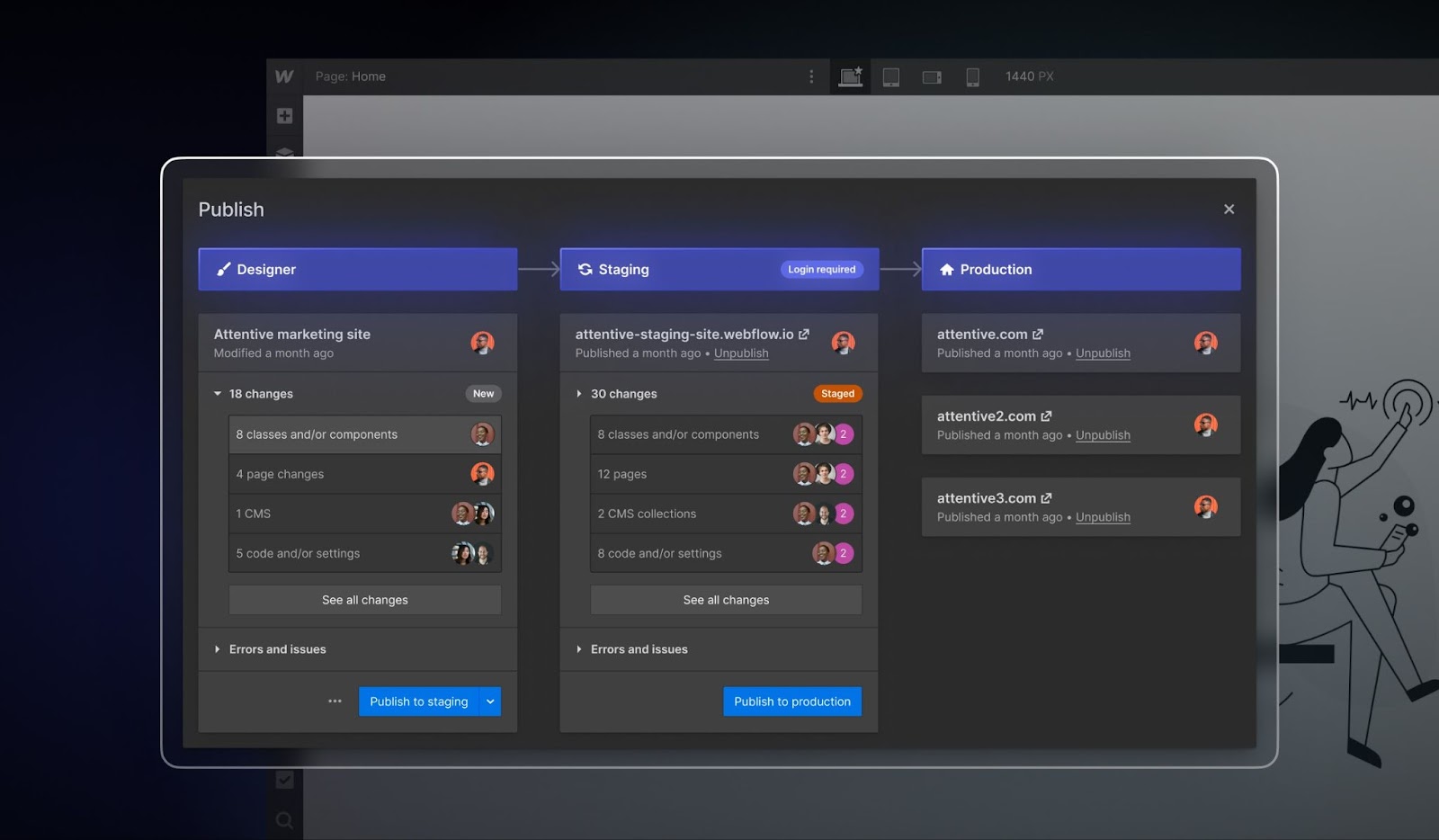
In the new publishing workflow, you can get a holistic view of changes that are headed for review on your staging site and changes that will go live to your production site:
- The first column’s summary of changes shows you the difference between what’s in the Designer and what’s on your Staging site.
- The second column’s summary of changes shows you the difference between your Staging site and your Production site.
This visibility gives you a comprehensive understanding of where proposed changes sit and where your team is at in the process of a new web release. On top of that, you can publish directly from your staging domain to your production domain, so large teams working concurrently can be confident unintended changes in the Designer won’t slip through. With this improved visibility and control, you can safely invite more web contributors and publish both with speed and confidence.
We also see the new publishing workflows unlocking much more sophisticated team workflows when used alongside our recent collaboration releases. Read our blog post to learn about how your team can level up how they collaborate and publish safely in Webflow.
The new publishing workflows are just the foundation for upcoming releases like being able to stage branches – stay tuned!
Related updates




















Get started for free
Try Webflow for as long as you like with our free Starter plan. Purchase a paid Site plan to publish, host, and unlock additional features.
Try Webflow for as long as you like with our free Starter plan. Purchase a paid Site plan to publish, host, and unlock additional features.